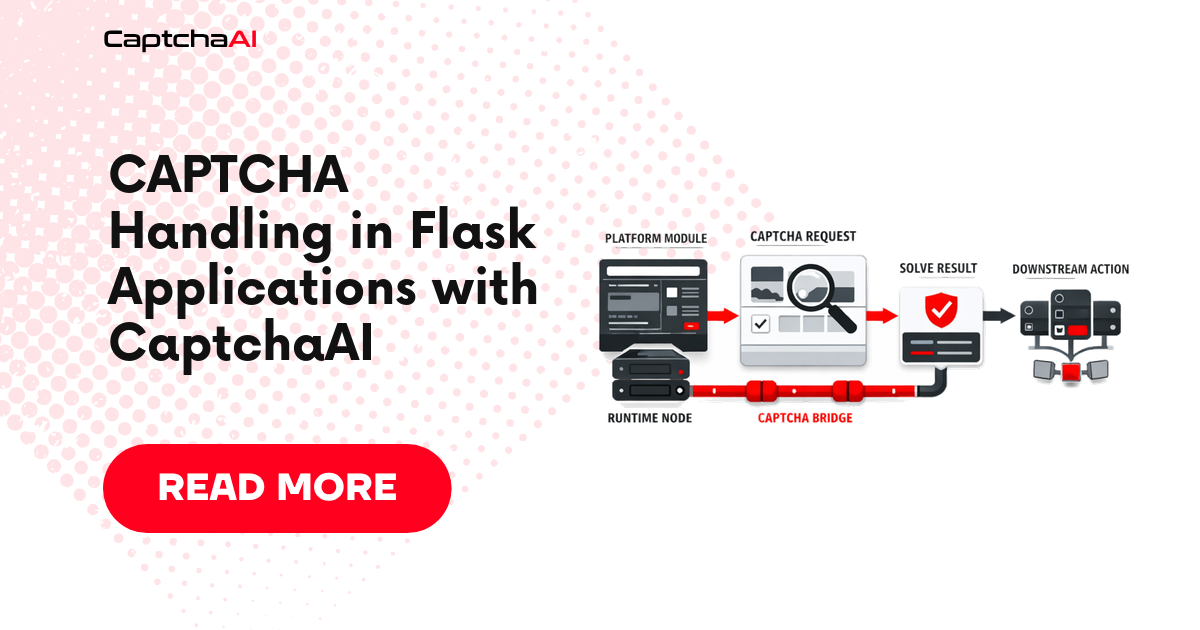
Flask's lightweight design makes it a natural fit for building CAPTCHA-solving APIs and automation services. This guide shows how to integrate CaptchaAI into Flask apps — from simple endpoint wrappers to production-ready background task processing.
Project setup
pip install flask requests
App structure
myapp/
├── app.py
├── config.py
├── services/
│   └── captcha_solver.py
└── templates/
    └── form.html
CaptchaAI service
# services/captcha_solver.py
import time
import requests


class CaptchaSolver:
    """CaptchaAI solver service for Flask applications."""

    API_BASE = "https://ocr.captchaai.com"

    def __init__(self, api_key):
        self.api_key = api_key

    def solve_recaptcha_v2(self, sitekey, page_url):
        """Solve reCAPTCHA v2."""
        return self._submit_and_poll({
            "method": "userrecaptcha",
            "googlekey": sitekey,
            "pageurl": page_url,
        })

    def solve_turnstile(self, sitekey, page_url):
        """Solve Cloudflare Turnstile."""
        return self._submit_and_poll({
            "method": "turnstile",
            "sitekey": sitekey,
            "pageurl": page_url,
        })

    def solve_image(self, image_base64):
        """Solve image CAPTCHA."""
        return self._submit_and_poll({
            "method": "base64",
            "body": image_base64,
        })

    def get_balance(self):
        """Check API balance."""
        resp = requests.get(f"{self.API_BASE}/res.php", params={
            "key": self.api_key,
            "action": "getbalance",
            "json": 1,
        }, timeout=30)
        return float(resp.json().get("request", 0))

    def _submit_and_poll(self, params, timeout=120):
        """Submit and poll for result."""
        submit_data = {"key": self.api_key, "json": 1, **params}

        resp = requests.post(f"{self.API_BASE}/in.php", data=submit_data, timeout=30)
        resp.raise_for_status()
        data = resp.json()

        if data.get("status") != 1:
            raise CaptchaSolveError(f"Submit failed: {data.get('request')}")

        task_id = data["request"]

        start = time.time()
        while time.time() - start < timeout:
            time.sleep(5)
            result = requests.get(f"{self.API_BASE}/res.php", params={
                "key": self.api_key,
                "action": "get",
                "id": task_id,
                "json": 1,
            }, timeout=30).json()

            if result.get("status") == 1:
                return result["request"]
            if result.get("request") == "ERROR_CAPTCHA_UNSOLVABLE":
                raise CaptchaSolveError("CAPTCHA unsolvable")

        raise CaptchaSolveError("Solve timed out")


class CaptchaSolveError(Exception):
    pass
Basic Flask app with CAPTCHA solving
# app.py
from flask import Flask, request, jsonify
from services.captcha_solver import CaptchaSolver, CaptchaSolveError

app = Flask(__name__)
app.config["CAPTCHAAI_API_KEY"] = "YOUR_API_KEY"

solver = CaptchaSolver(app.config["CAPTCHAAI_API_KEY"])


@app.route("/solve/recaptcha", methods=["POST"])
def solve_recaptcha():
    """Solve reCAPTCHA v2 via API."""
    data = request.get_json()
    sitekey = data.get("sitekey")
    page_url = data.get("url")

    if not sitekey or not page_url:
        return jsonify({"error": "sitekey and url required"}), 400

    try:
        token = solver.solve_recaptcha_v2(sitekey, page_url)
        return jsonify({"token": token})
    except CaptchaSolveError as e:
        return jsonify({"error": str(e)}), 500


@app.route("/solve/turnstile", methods=["POST"])
def solve_turnstile():
    """Solve Cloudflare Turnstile via API."""
    data = request.get_json()
    sitekey = data.get("sitekey")
    page_url = data.get("url")

    if not sitekey or not page_url:
        return jsonify({"error": "sitekey and url required"}), 400

    try:
        token = solver.solve_turnstile(sitekey, page_url)
        return jsonify({"token": token})
    except CaptchaSolveError as e:
        return jsonify({"error": str(e)}), 500


@app.route("/balance", methods=["GET"])
def check_balance():
    """Check CaptchaAI balance."""
    balance = solver.get_balance()
    return jsonify({"balance": balance})


if __name__ == "__main__":
    app.run(debug=True, port=5000)
Usage
# Solve reCAPTCHA
curl -X POST http://localhost:5000/solve/recaptcha \
  -H "Content-Type: application/json" \
  -d '{"sitekey": "6Le-wvkSAAAA...", "url": "https://example.com/login"}'

# Solve Turnstile
curl -X POST http://localhost:5000/solve/turnstile \
  -H "Content-Type: application/json" \
  -d '{"sitekey": "0x4AAAAAAAC3DHQ...", "url": "https://example.com/signup"}'

# Check balance
curl http://localhost:5000/balance
Flask with Turnstile form protection
Protect your Flask forms with Cloudflare Turnstile:
# app.py
from flask import Flask, request, render_template, redirect, url_for, flash
import requests as http_requests

app = Flask(__name__)
app.secret_key = "your-secret-key"
app.config["TURNSTILE_SITE_KEY"] = "0x4AAAAAAAC3DHQhMMQ_Rxrg"
app.config["TURNSTILE_SECRET_KEY"] = "0x4AAAAAAAC3DHQhYYY_secret"


def verify_turnstile(token, remote_ip=None):
    """Verify Turnstile token with Cloudflare."""
    data = {
        "secret": app.config["TURNSTILE_SECRET_KEY"],
        "response": token,
    }
    if remote_ip:
        data["remoteip"] = remote_ip

    resp = http_requests.post(
        "https://challenges.cloudflare.com/turnstile/v0/siteverify",
        data=data,
        timeout=10,
    )
    return resp.json().get("success", False)


@app.route("/contact", methods=["GET", "POST"])
def contact():
    if request.method == "POST":
        turnstile_token = request.form.get("cf-turnstile-response")

        if not turnstile_token:
            flash("CAPTCHA required")
            return redirect(url_for("contact"))

        if not verify_turnstile(turnstile_token, request.remote_addr):
            flash("CAPTCHA verification failed")
            return redirect(url_for("contact"))

        # Process the form
        name = request.form.get("name")
        email = request.form.get("email")
        # ... save or email the data
        flash("Message sent successfully")
        return redirect(url_for("contact"))

    return render_template("form.html",
                           turnstile_sitekey=app.config["TURNSTILE_SITE_KEY"])
<!-- templates/form.html -->
<!DOCTYPE html>
<html>
<body>
    <form method="post">
        <input name="name" placeholder="Name" required>
        <input name="email" type="email" placeholder="Email" required>
        <textarea name="message" placeholder="Message" required></textarea>
        <div class="cf-turnstile" data-sitekey="{{ turnstile_sitekey }}"></div>
        <button type="submit">Send</button>
    </form>
    <script src="https://challenges.cloudflare.com/turnstile/v0/api.js" async defer></script>
</body>
</html>
Background solving with threading
Flask is synchronous — use threading for non-blocking CAPTCHA solving:
import uuid
import threading
from flask import Flask, request, jsonify
from services.captcha_solver import CaptchaSolver, CaptchaSolveError

app = Flask(__name__)
solver = CaptchaSolver("YOUR_API_KEY")

# In-memory task storage (use Redis in production)
tasks = {}


def solve_in_background(task_id, captcha_type, sitekey, page_url):
    """Background CAPTCHA solver."""
    try:
        if captcha_type == "recaptcha_v2":
            token = solver.solve_recaptcha_v2(sitekey, page_url)
        elif captcha_type == "turnstile":
            token = solver.solve_turnstile(sitekey, page_url)
        else:
            raise ValueError(f"Unknown type: {captcha_type}")

        tasks[task_id] = {"status": "solved", "token": token}

    except CaptchaSolveError as e:
        tasks[task_id] = {"status": "failed", "error": str(e)}


@app.route("/solve/async", methods=["POST"])
def solve_async():
    """Submit CAPTCHA for background solving."""
    data = request.get_json()
    captcha_type = data.get("type", "recaptcha_v2")
    sitekey = data.get("sitekey")
    page_url = data.get("url")

    if not sitekey or not page_url:
        return jsonify({"error": "sitekey and url required"}), 400

    task_id = str(uuid.uuid4())
    tasks[task_id] = {"status": "pending"}

    thread = threading.Thread(
        target=solve_in_background,
        args=(task_id, captcha_type, sitekey, page_url),
    )
    thread.start()

    return jsonify({"task_id": task_id}), 202


@app.route("/solve/status/<task_id>")
def solve_status(task_id):
    """Check solving status."""
    task = tasks.get(task_id)
    if not task:
        return jsonify({"error": "Task not found"}), 404
    return jsonify(task)
Usage
# Submit async solve
curl -X POST http://localhost:5000/solve/async \
  -H "Content-Type: application/json" \
  -d '{"type": "turnstile", "sitekey": "0x4AAA...", "url": "https://example.com"}'
# Returns: {"task_id": "abc-123-..."}

# Check status
curl http://localhost:5000/solve/status/abc-123-...
# Returns: {"status": "pending"}  or  {"status": "solved", "token": "..."}
Flask Blueprint pattern
For larger apps, organize CAPTCHA routes as a Flask Blueprint:
# blueprints/captcha.py
from flask import Blueprint, request, jsonify, current_app
from services.captcha_solver import CaptchaSolver, CaptchaSolveError

captcha_bp = Blueprint("captcha", __name__, url_prefix="/api/captcha")


def get_solver():
    return CaptchaSolver(current_app.config["CAPTCHAAI_API_KEY"])


@captcha_bp.route("/solve", methods=["POST"])
def solve():
    data = request.get_json()
    captcha_type = data.get("type")
    sitekey = data.get("sitekey")
    url = data.get("url")

    solver = get_solver()

    try:
        if captcha_type == "recaptcha_v2":
            token = solver.solve_recaptcha_v2(sitekey, url)
        elif captcha_type == "turnstile":
            token = solver.solve_turnstile(sitekey, url)
        elif captcha_type == "image":
            image_b64 = data.get("image")
            token = solver.solve_image(image_b64)
        else:
            return jsonify({"error": f"Unknown type: {captcha_type}"}), 400

        return jsonify({"token": token})

    except CaptchaSolveError as e:
        return jsonify({"error": str(e)}), 500


@captcha_bp.route("/balance")
def balance():
    solver = get_solver()
    return jsonify({"balance": solver.get_balance()})
# app.py
from flask import Flask
from blueprints.captcha import captcha_bp

app = Flask(__name__)
app.config["CAPTCHAAI_API_KEY"] = "YOUR_API_KEY"
app.register_blueprint(captcha_bp)
Troubleshooting
| Symptom | Cause | Fix |
|---|---|---|
| Request hangs for 2+ minutes | Synchronous solve blocks Flask | Use threading or async pattern |
ConnectionError |
CaptchaAI API unreachable | Check network/firewall |
| Token returned empty | JSON parsing error | Check response format |
| Turnstile verification fails | Wrong secret key | Double-check TURNSTILE_SECRET_KEY |
| Memory grows in background tasks | Tasks dict never cleaned | Add TTL and cleanup |
Frequently asked questions
Should I use Flask or Django for CaptchaAI?
Flask is better for lightweight APIs and microservices. Django is better for full-featured web apps with admin panels. The CaptchaAI integration pattern is the same.
How do I handle request timeouts?
Set Flask's request timeout in your WSGI server (Gunicorn: --timeout 180). CAPTCHA solving can take 15-120 seconds.
Can I use Flask-CORS with the solving API?
Yes. Add flask-cors for cross-origin requests to your solving endpoint.
Should I rate-limit my solving endpoint?
Yes. Use flask-limiter to prevent abuse of your solving API endpoint.
Summary
Flask integrates with CaptchaAI through a service class that handles submit/poll flows. Use synchronous endpoints for simple use cases, background threading for non-blocking solves, and Flask Blueprints for organized larger applications. The same service handles reCAPTCHA, Turnstile, and image CAPTCHAs.
Related Articles
- Geetest Vs Cloudflare Turnstile Comparison
- Cloudflare Turnstile 403 After Token Fix
- Cloudflare Turnstile Widget Modes Explained
Full Working Code
Complete runnable examples for this article in Python, Node.js, PHP, Go, Java, C#, Ruby, Rust, Kotlin & Bash.
View on GitHub →

Discussions (0)
Join the conversation
Sign in to share your opinion.
Sign InNo comments yet.