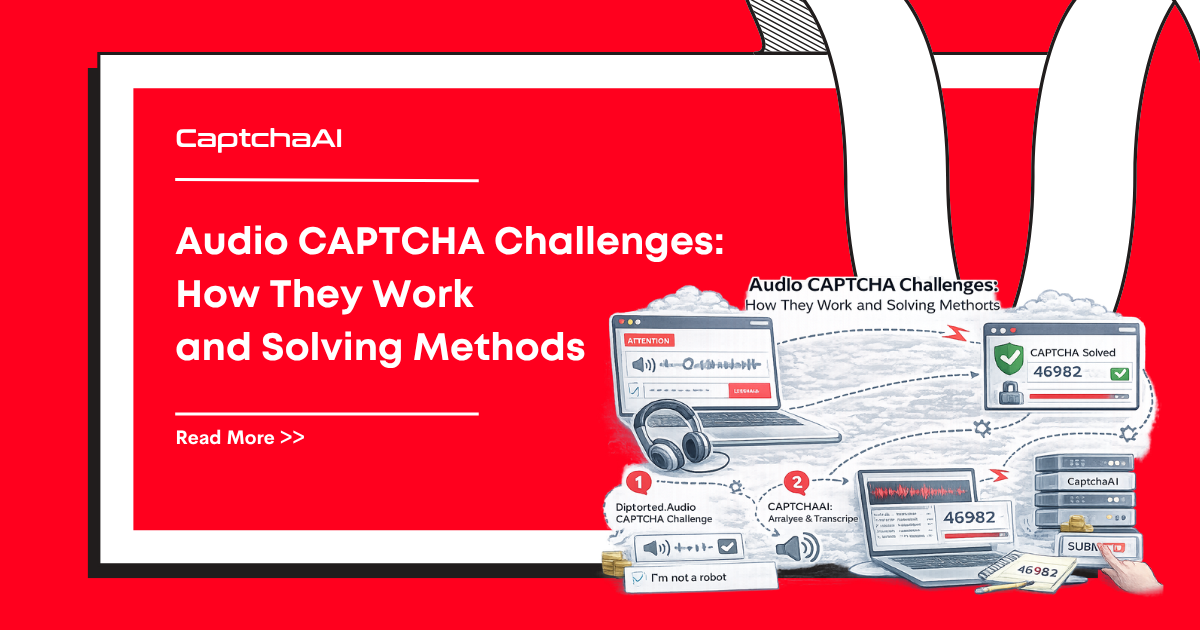
Audio CAPTCHAs are accessibility alternatives to visual challenges. When a user cannot complete an image-grid or checkbox CAPTCHA — due to visual impairment, screen reader usage, or environment limitations — most CAPTCHA providers offer an audio challenge. The user listens to distorted spoken numbers or words and types the answer. If your automation workflow encounters an audio CAPTCHA button (headphone icon) next to a visual challenge, understanding how audio challenges work can provide an alternative solving path.
This explainer covers how audio CAPTCHAs work across major providers, their technical architecture, and what developers need to know.
How audio CAPTCHAs work
Audio CAPTCHAs follow a consistent pattern across providers:
- Trigger — The user clicks an audio challenge button, usually represented by a headphone or speaker icon.
- Audio delivery — The system plays a short audio clip containing distorted spoken characters (numbers, letters, or words) mixed with background noise.
- User input — The user types what they hear into an input field.
- Validation — The system compares the user's input against the expected answer, with some tolerance for minor errors.
- Token return — If correct, the same token/response mechanism activates as the visual challenge — the completion is equivalent.
Audio challenge characteristics by provider
| Provider | Audio content | Length | Background noise | Retry allowed |
|---|---|---|---|---|
| reCAPTCHA v2 | Spoken digits (0-9) | 8-10 digits | Moderate distortion + ambient noise | Yes |
| reCAPTCHA v3 | No audio — v3 has no visible challenge | N/A | N/A | N/A |
| reCAPTCHA Invisible | Same as v2 audio when fallback triggers | 8-10 digits | Same as v2 | Yes |
| hCaptcha | Spoken words or sentences | Variable | Light distortion | Yes |
| FunCaptcha | Limited availability | Variable | Variable | Limited |
| AWS WAF CAPTCHA | Built-in audio mode | Variable | Moderate | Yes |
reCAPTCHA audio challenges in detail
reCAPTCHA v2 is the most common provider with audio challenges. The audio challenge flow:
Accessing the audio challenge
Visual challenge presented
    ↓
User clicks headphone icon (bottom-left of challenge iframe)
    ↓
Audio challenge iframe loads
    ↓
Audio file plays (MP3 format)
    ↓
User types digits they hear
    ↓
"Verify" button validates input
    ↓
Same g-recaptcha-response token returned
Audio file details
- Format: MP3, served from
https://www.google.com/recaptcha/api2/payload/audio.mp3?... - Content: A sequence of spoken digits (e.g., "seven three nine two one four eight six")
- Distortion: Background noise, varying speaker voices, speed changes
- Duration: Typically 5-10 seconds
Detection in automation
from selenium import webdriver
from selenium.webdriver.common.by import By

driver = webdriver.Chrome()
driver.get("https://example.com/login")

# Switch to reCAPTCHA iframe
recaptcha_frame = driver.find_element(By.CSS_SELECTOR, "iframe[title*='reCAPTCHA']")
driver.switch_to.frame(recaptcha_frame)

# Click the checkbox to trigger challenge
checkbox = driver.find_element(By.ID, "recaptcha-anchor")
checkbox.click()

# Switch to challenge iframe
driver.switch_to.default_content()
challenge_frame = driver.find_element(
    By.CSS_SELECTOR, "iframe[title*='recaptcha challenge']"
)
driver.switch_to.frame(challenge_frame)

# Click audio challenge button
audio_button = driver.find_element(By.ID, "recaptcha-audio-button")
audio_button.click()

# Audio challenge is now active
# The audio source URL can be extracted from the page
audio_source = driver.find_element(By.ID, "audio-source").get_attribute("src")
print(f"Audio file URL: {audio_source}")
// Node.js Puppeteer equivalent
const page = await browser.newPage();
await page.goto('https://example.com/login');

// Find and switch to reCAPTCHA iframe
const recaptchaFrame = await page.waitForSelector(
    'iframe[title*="reCAPTCHA"]'
);
const frame = await recaptchaFrame.contentFrame();

// Click checkbox
await frame.click('#recaptcha-anchor');
await page.waitForTimeout(2000);

// Switch to challenge iframe
const challengeFrame = await page.waitForSelector(
    'iframe[title*="recaptcha challenge"]'
);
const challenge = await challengeFrame.contentFrame();

// Click audio button
await challenge.click('#recaptcha-audio-button');
await page.waitForTimeout(1000);

// Get audio source URL
const audioSrc = await challenge.$eval(
    '#audio-source',
    el => el.src
);
console.log(`Audio file URL: ${audioSrc}`);
Audio CAPTCHA solving approaches
Speech-to-text recognition
Audio CAPTCHA solving typically involves:
- Download the audio file from the challenge
- Process through speech recognition — services like Google Speech-to-Text, Whisper, or specialized audio CAPTCHA models
- Submit the transcription as the answer
Challenges with audio solving
| Challenge | Description |
|---|---|
| Distortion | Audio is deliberately distorted to resist automated recognition |
| Background noise | Random noise, music, or overlapping voices make recognition harder |
| Rate limiting | Too many audio challenge requests trigger CAPTCHA lockout |
| Anti-bot detection | reCAPTCHA may detect automated audio requests and block further attempts |
| Variable quality | Audio quality varies between challenges, making consistent recognition difficult |
| Language variants | Some audio challenges use accented speech or non-English numbers |
API-based solving vs audio recognition
For most automation workflows, using a CAPTCHA solving API that handles the visual challenge directly is more reliable than attempting audio recognition:
| Approach | Success rate | Speed | Complexity |
|---|---|---|---|
| API solver (visual) | 95-99.5% | 10-30 seconds | Low — submit sitekey, get token |
| Audio recognition | 60-85% | 5-15 seconds | High — audio download, STT, retry logic |
| Manual solving | 99%+ | 30-120 seconds | None — human solves |
For reliable CAPTCHA solving in production workflows:
Audio CAPTCHA accessibility standards
Audio CAPTCHAs exist because of web accessibility requirements:
- WCAG 2.1 Level AA — Requires non-visual alternatives for visual CAPTCHA challenges
- Section 508 — US federal accessibility standard requiring alternative access methods
- EN 301 549 — European accessibility standard for ICT products
What accessibility standards require
- Audio alternative must be available for all visual CAPTCHA challenges
- Audio content must be understandable (not excessively distorted)
- Users must be able to replay the audio
- Download option should be available for offline playback
- Volume control should be accessible
When audio CAPTCHAs fail accessibility
Despite being an "accessibility feature," audio CAPTCHAs often fail their own purpose:
- Heavy distortion makes them nearly unusable for many users
- Background noise competes with the spoken content
- Time limits create pressure for users who need longer processing time
- No visual transcript is provided alongside the audio
- Multiple consecutive failures lock users out entirely
Frequently asked questions
Do all CAPTCHA providers offer audio challenges?
No. reCAPTCHA v2, hCaptcha, and some enterprise providers offer audio alternatives. reCAPTCHA v3 has no challenge at all (visual or audio). Cloudflare Turnstile has no audio mode because its challenges are designed to be invisible. FunCaptcha has limited audio support.
Is the audio challenge token the same as the visual challenge token?
Yes. Whether a user solves the visual challenge or the audio challenge, the resulting token (e.g., g-recaptcha-response) is identical in format and function. The target website cannot distinguish how the challenge was solved.
Can I force a reCAPTCHA to show the audio challenge instead of images?
You can programmatically click the audio button to switch to audio mode, but reCAPTCHA may block repeated audio requests from the same IP or session. Google has specifically hardened audio challenges against automated solving.
Why do audio CAPTCHAs sound so distorted?
The distortion is deliberate anti-automation protection. Clear audio would be trivially solved by speech recognition services. The distortion level is calibrated to be solvable by humans (with effort) while resisting automated transcription.
Are audio CAPTCHAs getting harder over time?
Yes. As speech recognition technology improves (Whisper, Google STT), CAPTCHA providers increase audio distortion to maintain the gap between human and machine recognition. This creates an arms race that increasingly hurts legitimate accessibility users.
Summary
Audio CAPTCHAs are accessibility alternatives to visual CAPTCHA challenges, offering spoken digit or word recognition instead of image selection. reCAPTCHA v2 is the most common provider with audio challenges. While audio solving is possible through speech recognition, API-based visual challenge solving through services like CaptchaAI is typically more reliable and faster for production automation workflows.

Discussions (0)
Join the conversation
Sign in to share your opinion.
Sign InNo comments yet.