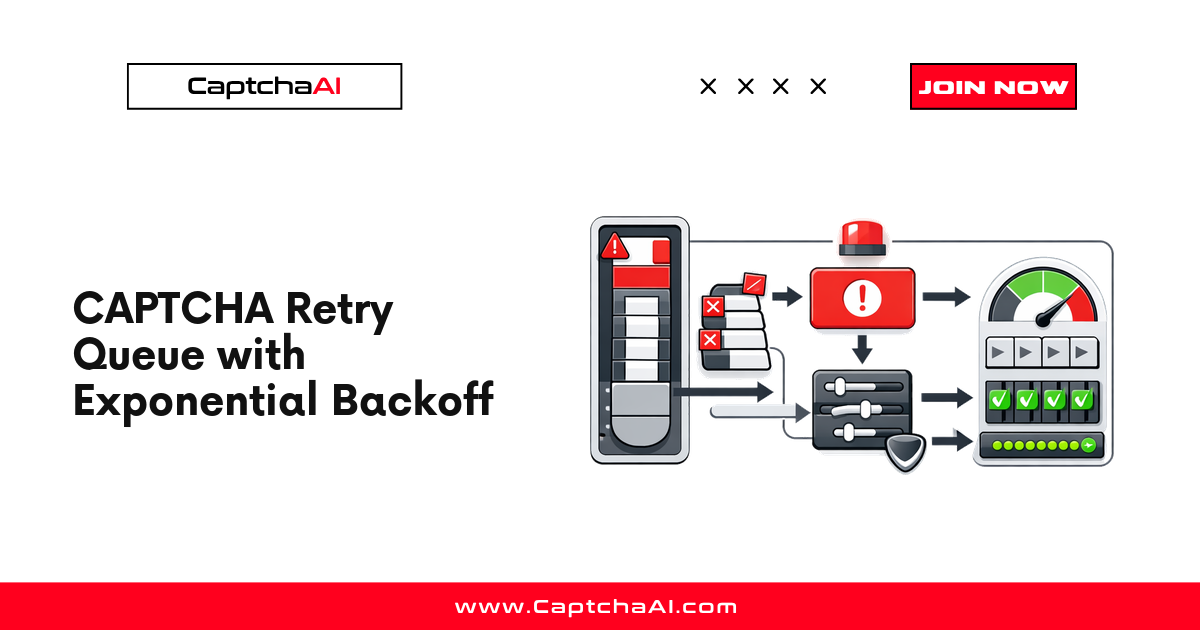
CaptchaAI API calls can fail for transient reasons — rate limits, temporary network issues, unsolvable images. A retry queue with exponential backoff handles these failures without overwhelming the API or burning budget.
When to retry vs when to fail
| Error | Retry? | Backoff? | Max retries |
|---|---|---|---|
ERROR_NO_SLOT_AVAILABLE |
Yes | Yes | 5 |
ERROR_CAPTCHA_UNSOLVABLE |
Yes | No | 2 |
CAPCHA_NOT_READY |
Yes (keep polling) | Linear | Until timeout |
ERROR_ZERO_BALANCE |
No | — | 0 |
ERROR_WRONG_CAPTCHA_ID |
No | — | 0 |
ERROR_KEY_DOES_NOT_EXIST |
No | — | 0 |
| HTTP 429 (rate limit) | Yes | Yes | 5 |
| Network timeout | Yes | Yes | 3 |
Rule: Retry transient errors. Never retry permanent errors (bad key, zero balance, wrong ID).
Exponential backoff formula
wait = base_delay * (2 ^ attempt) + random_jitter
- Base delay: 1–2 seconds
- Max delay cap: 60 seconds
- Jitter: Random 0–1 second to prevent thundering herd
Example progression:
Attempt 0: 1s + jitter
Attempt 1: 2s + jitter
Attempt 2: 4s + jitter
Attempt 3: 8s + jitter
Attempt 4: 16s + jitter
Python implementation
import requests
import time
import random
from dataclasses import dataclass, field
from collections import deque
from typing import Optional, Callable

SUBMIT_URL = "https://ocr.captchaai.com/in.php"
RESULT_URL = "https://ocr.captchaai.com/res.php"

PERMANENT_ERRORS = {
    "ERROR_ZERO_BALANCE",
    "ERROR_KEY_DOES_NOT_EXIST",
    "ERROR_WRONG_CAPTCHA_ID",
    "ERROR_IP_NOT_ALLOWED",
    "ERROR_WRONG_USER_KEY",
}

@dataclass
class RetryTask:
    task_id: str
    method: str
    params: dict
    attempt: int = 0
    max_retries: int = 3
    base_delay: float = 1.0
    max_delay: float = 60.0
    on_success: Optional[Callable] = None
    on_failure: Optional[Callable] = None


class RetryQueue:
    def __init__(self, api_key: str):
        self.api_key = api_key
        self.queue = deque()
        self.dead_letter = []

    def submit(self, method: str, params: dict,
               max_retries: int = 3, on_success=None, on_failure=None) -> Optional[str]:
        data = {
            "key": self.api_key,
            "method": method,
            "json": 1,
            **params
        }

        try:
            resp = requests.post(SUBMIT_URL, data=data, timeout=15)
            result = resp.json()

            if result.get("status") == 1:
                task = RetryTask(
                    task_id=result["request"],
                    method=method,
                    params=params,
                    max_retries=max_retries,
                    on_success=on_success,
                    on_failure=on_failure,
                )
                self.queue.append(task)
                return result["request"]

            error = result.get("error_text", result.get("request", ""))

            if error in PERMANENT_ERRORS:
                print(f"Permanent error: {error}")
                return None

            # Transient submit error — create task for retry
            task = RetryTask(
                task_id="",
                method=method,
                params=params,
                max_retries=max_retries,
                on_success=on_success,
                on_failure=on_failure,
            )
            self._schedule_retry(task, error)
            return None

        except requests.RequestException as e:
            print(f"Network error on submit: {e}")
            return None

    def _backoff_delay(self, attempt: int, base: float, cap: float) -> float:
        delay = min(base * (2 ** attempt), cap)
        jitter = random.uniform(0, 1)
        return delay + jitter

    def _schedule_retry(self, task: RetryTask, error: str):
        task.attempt += 1
        if task.attempt > task.max_retries:
            print(f"Max retries reached for task {task.task_id}: {error}")
            self.dead_letter.append(task)
            if task.on_failure:
                task.on_failure(task, error)
            return

        delay = self._backoff_delay(task.attempt, task.base_delay, task.max_delay)
        print(f"Retry {task.attempt}/{task.max_retries} for {task.task_id} in {delay:.1f}s ({error})")
        time.sleep(delay)

        if not task.task_id:
            # Re-submit
            self.submit(task.method, task.params, task.max_retries,
                        task.on_success, task.on_failure)
        else:
            self.queue.append(task)

    def poll_all(self, poll_interval: int = 5, max_wait: int = 120):
        start = time.time()

        while self.queue and (time.time() - start) < max_wait:
            time.sleep(poll_interval)
            batch = list(self.queue)
            self.queue.clear()

            for task in batch:
                try:
                    resp = requests.get(RESULT_URL, params={
                        "key": self.api_key,
                        "action": "get",
                        "id": task.task_id,
                        "json": 1
                    }, timeout=10)
                    result = resp.json()

                    if result.get("status") == 1:
                        print(f"Solved {task.task_id}: {result['request'][:40]}...")
                        if task.on_success:
                            task.on_success(result["request"])
                        continue

                    if result.get("request") == "CAPCHA_NOT_READY":
                        self.queue.append(task)
                        continue

                    error = result.get("error_text", result.get("request", ""))
                    if error in PERMANENT_ERRORS:
                        print(f"Permanent error for {task.task_id}: {error}")
                        self.dead_letter.append(task)
                        if task.on_failure:
                            task.on_failure(task, error)
                    else:
                        self._schedule_retry(task, error)

                except requests.RequestException as e:
                    print(f"Network error polling {task.task_id}: {e}")
                    self._schedule_retry(task, str(e))

        # Timeout remaining tasks
        for task in self.queue:
            print(f"Timeout: {task.task_id}")
            self.dead_letter.append(task)
            if task.on_failure:
                task.on_failure(task, "TIMEOUT")
        self.queue.clear()


# Usage
rq = RetryQueue(api_key="YOUR_API_KEY")

rq.submit(
    method="userrecaptcha",
    params={"googlekey": "6Le-SITEKEY", "pageurl": "https://example.com"},
    max_retries=3,
    on_success=lambda token: print(f"Got token: {token[:40]}..."),
    on_failure=lambda task, err: print(f"Failed: {err}")
)

rq.poll_all(poll_interval=5, max_wait=120)

print(f"Dead letter queue: {len(rq.dead_letter)} tasks")
Node.js implementation
const axios = require("axios");

const SUBMIT_URL = "https://ocr.captchaai.com/in.php";
const RESULT_URL = "https://ocr.captchaai.com/res.php";

const PERMANENT_ERRORS = new Set([
  "ERROR_ZERO_BALANCE",
  "ERROR_KEY_DOES_NOT_EXIST",
  "ERROR_WRONG_CAPTCHA_ID",
  "ERROR_IP_NOT_ALLOWED",
  "ERROR_WRONG_USER_KEY",
]);

function backoffDelay(attempt, base = 1000, cap = 60000) {
  const delay = Math.min(base * Math.pow(2, attempt), cap);
  const jitter = Math.random() * 1000;
  return delay + jitter;
}

async function solveWithRetry(apiKey, method, params, maxRetries = 3) {
  let lastError;

  for (let attempt = 0; attempt <= maxRetries; attempt++) {
    if (attempt > 0) {
      const delay = backoffDelay(attempt);
      console.log(`Retry ${attempt}/${maxRetries} in ${(delay / 1000).toFixed(1)}s`);
      await new Promise((r) => setTimeout(r, delay));
    }

    try {
      // Submit
      const submitResp = await axios.post(SUBMIT_URL, null, {
        params: { key: apiKey, method, json: 1, ...params },
        timeout: 15000,
      });

      if (submitResp.data.status !== 1) {
        const code = submitResp.data.error_text || submitResp.data.request;
        if (PERMANENT_ERRORS.has(code)) throw new Error(`Permanent: ${code}`);
        lastError = new Error(code);
        continue;
      }

      const taskId = submitResp.data.request;

      // Poll
      const token = await pollResult(apiKey, taskId);
      return token;
    } catch (err) {
      if (err.message.startsWith("Permanent:")) throw err;
      lastError = err;
    }
  }

  throw lastError;
}

async function pollResult(apiKey, taskId, maxWait = 120000) {
  const interval = 5000;
  let elapsed = 0;

  while (elapsed < maxWait) {
    await new Promise((r) => setTimeout(r, interval));
    elapsed += interval;

    const resp = await axios.get(RESULT_URL, {
      params: { key: apiKey, action: "get", id: taskId, json: 1 },
      timeout: 10000,
    });

    if (resp.data.status === 1) return resp.data.request;
    if (resp.data.request === "CAPCHA_NOT_READY") continue;

    const code = resp.data.error_text || resp.data.request;
    if (PERMANENT_ERRORS.has(code)) throw new Error(`Permanent: ${code}`);
    throw new Error(code);
  }

  throw new Error("TIMEOUT");
}

// Usage
(async () => {
  try {
    const token = await solveWithRetry(
      "YOUR_API_KEY",
      "userrecaptcha",
      { googlekey: "6Le-SITEKEY", pageurl: "https://example.com" },
      3
    );
    console.log(`Token: ${token.slice(0, 40)}...`);
  } catch (err) {
    console.error(`Failed after retries: ${err.message}`);
  }
})();
Tuning backoff parameters
| Parameter | Conservative | Aggressive | Notes |
|---|---|---|---|
base_delay |
2s | 0.5s | Lower = faster retries |
max_delay |
120s | 30s | Cap prevents long waits |
max_retries |
5 | 2 | More retries = more cost |
jitter |
0–2s | 0–0.5s | Prevents synchronized retries |
Dead letter queue pattern
Tasks that exhaust all retries go to a dead letter queue for:
- Manual review — inspect the CAPTCHA type and parameters
- Alerting — trigger notifications when dead letter count rises
- Replay — retry later after fixing the root cause
if len(rq.dead_letter) > 10:
    print("ALERT: Dead letter queue growing — check API key, balance, or proxy")
Troubleshooting
| Problem | Cause | Fix |
|---|---|---|
| All retries fail immediately | Permanent error being retried | Check error against PERMANENT_ERRORS set |
| Backoff too aggressive | Low max_delay cap |
Increase cap to 60s+ |
| Budget waste | Retrying unsolvable CAPTCHAs | Limit ERROR_CAPTCHA_UNSOLVABLE retries to 1–2 |
| Thundering herd after outage | No jitter | Add random jitter to backoff |
FAQ
How does exponential backoff differ from linear backoff?
Exponential doubles the wait each attempt (1s, 2s, 4s, 8s), while linear adds a fixed interval (1s, 2s, 3s, 4s). Exponential is better for rate limits because it backs off quickly.
Should I retry ERROR_CAPTCHA_UNSOLVABLE?
Yes, but limit to 1–2 retries. The image may be genuinely unsolvable, and more retries just burn credits.
What happens if the API is down for several minutes?
With a 60-second cap and 5 retries, the last retry fires around 2 minutes after the first attempt. If the API is still down, tasks move to the dead letter queue for manual replay.
Build reliable CAPTCHA workflows with CaptchaAI
Start implementing retry queues at captchaai.com.
Related guides
- Implementing Retry Logic
- API Rate Limiting (429 Responses)
- Error Codes Reference
- Building Client CAPTCHA Pipelines
Full Working Code
Complete runnable examples for this article in Python, Node.js, PHP, Go, Java, C#, Ruby, Rust, Kotlin & Bash.
View on GitHub →



Discussions (0)
Join the conversation
Sign in to share your opinion.
Sign InNo comments yet.