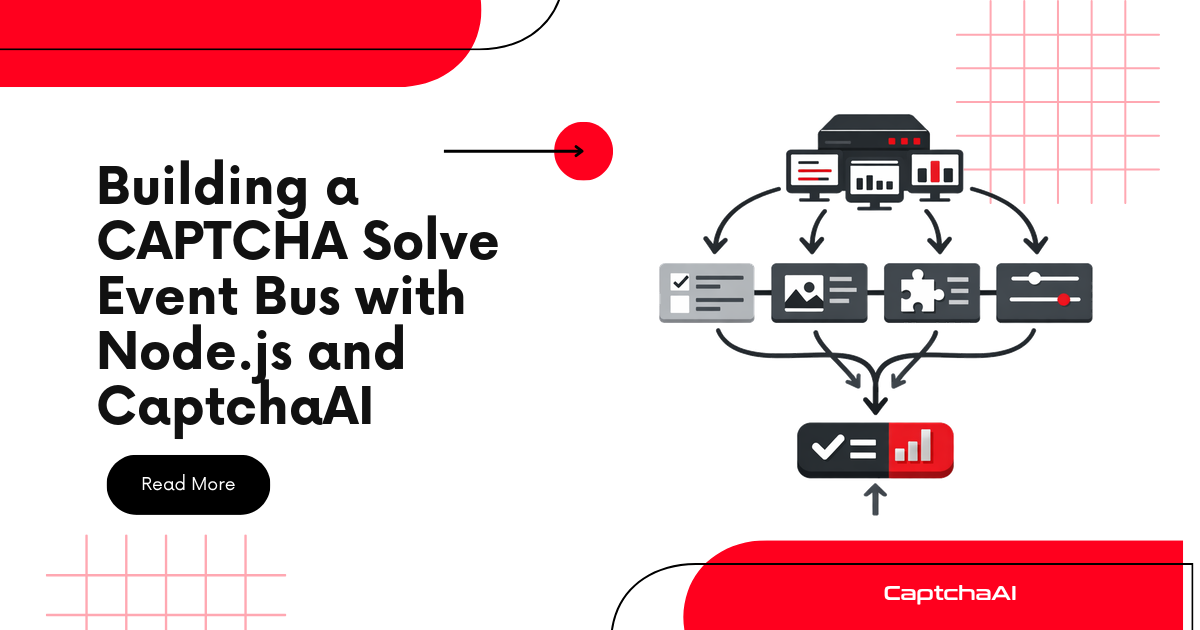
Callbacks and polling handle results, but they don't give your application visibility into the full CAPTCHA lifecycle. An event bus broadcasts state changes — submitted, pending, solved, failed, timed out — so any part of your application can react without tight coupling.
Event Bus Architecture
[CaptchaBus]
   ├── emit("submitted", { taskId, type, pageurl })
   ├── emit("pending", { taskId, elapsed })
   ├── emit("solved", { taskId, solution, duration })
   ├── emit("failed", { taskId, error, duration })
   └── emit("timeout", { taskId, elapsed })
        ↓          ↓           ↓
   [Logger]    [Metrics]   [Retry Handler]
Listeners register independently. Adding a new feature (e.g., metrics collection) requires zero changes to the solving code.
The CaptchaBus Class — JavaScript
const EventEmitter = require("events");
const axios = require("axios");

class CaptchaBus extends EventEmitter {
  constructor(apiKey, options = {}) {
    super();
    this.apiKey = apiKey;
    this.pollInterval = options.pollInterval || 5000;
    this.maxWait = options.maxWait || 300000; // 5 minutes
    this.pending = new Map();
  }

  async submit(params) {
    const { method, sitekey, pageurl, ...extra } = params;
    const taskId = `task_${Date.now()}_${Math.random().toString(36).slice(2, 8)}`;

    const submitParams = {
      key: this.apiKey,
      method: method || "userrecaptcha",
      googlekey: sitekey,
      pageurl: pageurl,
      json: 1,
      ...extra,
    };

    try {
      const resp = await axios.post(
        "https://ocr.captchaai.com/in.php",
        null,
        { params: submitParams }
      );

      if (resp.data.status !== 1) {
        this.emit("failed", {
          taskId,
          error: resp.data.request,
          duration: 0,
        });
        return null;
      }

      const captchaId = resp.data.request;
      const startTime = Date.now();

      this.emit("submitted", {
        taskId,
        captchaId,
        method: method || "userrecaptcha",
        pageurl,
      });

      // Start polling
      this._poll(taskId, captchaId, startTime);
      return taskId;
    } catch (err) {
      this.emit("failed", { taskId, error: err.message, duration: 0 });
      return null;
    }
  }

  async _poll(taskId, captchaId, startTime) {
    const check = async () => {
      const elapsed = Date.now() - startTime;

      if (elapsed > this.maxWait) {
        this.emit("timeout", { taskId, elapsed });
        return;
      }

      this.emit("pending", { taskId, elapsed });

      try {
        const resp = await axios.get("https://ocr.captchaai.com/res.php", {
          params: {
            key: this.apiKey,
            action: "get",
            id: captchaId,
            json: 1,
          },
        });

        if (resp.data.status === 1) {
          this.emit("solved", {
            taskId,
            captchaId,
            solution: resp.data.request,
            duration: Date.now() - startTime,
          });
        } else if (resp.data.request === "CAPCHA_NOT_READY") {
          setTimeout(check, this.pollInterval);
        } else {
          this.emit("failed", {
            taskId,
            error: resp.data.request,
            duration: Date.now() - startTime,
          });
        }
      } catch (err) {
        this.emit("failed", {
          taskId,
          error: err.message,
          duration: Date.now() - startTime,
        });
      }
    };

    setTimeout(check, this.pollInterval);
  }
}

module.exports = CaptchaBus;
Registering Event Listeners
const CaptchaBus = require("./captcha-bus");

const bus = new CaptchaBus(process.env.CAPTCHAAI_API_KEY, {
  pollInterval: 5000,
  maxWait: 120000,
});

// Logging listener
bus.on("submitted", (e) => {
  console.log(`[SUBMIT] ${e.taskId} → ${e.method} on ${e.pageurl}`);
});

bus.on("pending", (e) => {
  console.log(`[PENDING] ${e.taskId} — ${(e.elapsed / 1000).toFixed(1)}s`);
});

bus.on("solved", (e) => {
  console.log(
    `[SOLVED] ${e.taskId} in ${(e.duration / 1000).toFixed(1)}s — ${e.solution.substring(0, 30)}...`
  );
});

bus.on("failed", (e) => {
  console.error(`[FAILED] ${e.taskId} — ${e.error}`);
});

bus.on("timeout", (e) => {
  console.error(
    `[TIMEOUT] ${e.taskId} after ${(e.elapsed / 1000).toFixed(1)}s`
  );
});

// Metrics listener
const metrics = { submitted: 0, solved: 0, failed: 0, totalDuration: 0 };

bus.on("submitted", () => metrics.submitted++);
bus.on("solved", (e) => {
  metrics.solved++;
  metrics.totalDuration += e.duration;
});
bus.on("failed", () => metrics.failed++);

// Submit a CAPTCHA
bus.submit({
  sitekey: "6Le-wvkSAAAAAPBMRTvw0Q4Muexq9bi0DJwx_mJ-",
  pageurl: "https://example.com",
});
Python Equivalent
import os
import time
import threading
from collections import defaultdict
import requests


class CaptchaBus:
    def __init__(self, api_key, poll_interval=5, max_wait=300):
        self.api_key = api_key
        self.poll_interval = poll_interval
        self.max_wait = max_wait
        self._listeners = defaultdict(list)

    def on(self, event, callback):
        """Register a listener for an event."""
        self._listeners[event].append(callback)
        return self

    def emit(self, event, data):
        """Emit an event to all registered listeners."""
        for callback in self._listeners.get(event, []):
            try:
                callback(data)
            except Exception as e:
                print(f"Listener error on {event}: {e}")

    def submit(self, sitekey, pageurl, method="userrecaptcha", **extra):
        """Submit a CAPTCHA and begin tracking."""
        task_id = f"task_{int(time.time())}_{id(sitekey) % 10000}"

        resp = requests.post("https://ocr.captchaai.com/in.php", data={
            "key": self.api_key,
            "method": method,
            "googlekey": sitekey,
            "pageurl": pageurl,
            "json": 1,
            **extra
        })
        data = resp.json()

        if data.get("status") != 1:
            self.emit("failed", {
                "task_id": task_id,
                "error": data.get("request"),
                "duration": 0
            })
            return None

        captcha_id = data["request"]
        start_time = time.time()

        self.emit("submitted", {
            "task_id": task_id,
            "captcha_id": captcha_id,
            "method": method,
            "pageurl": pageurl
        })

        # Poll in a background thread
        thread = threading.Thread(
            target=self._poll,
            args=(task_id, captcha_id, start_time),
            daemon=True
        )
        thread.start()
        return task_id

    def _poll(self, task_id, captcha_id, start_time):
        while True:
            elapsed = time.time() - start_time

            if elapsed > self.max_wait:
                self.emit("timeout", {"task_id": task_id, "elapsed": elapsed})
                return

            time.sleep(self.poll_interval)
            self.emit("pending", {"task_id": task_id, "elapsed": elapsed})

            resp = requests.get("https://ocr.captchaai.com/res.php", params={
                "key": self.api_key,
                "action": "get",
                "id": captcha_id,
                "json": 1
            })
            data = resp.json()

            if data.get("status") == 1:
                self.emit("solved", {
                    "task_id": task_id,
                    "solution": data["request"],
                    "duration": time.time() - start_time
                })
                return
            elif data.get("request") != "CAPCHA_NOT_READY":
                self.emit("failed", {
                    "task_id": task_id,
                    "error": data.get("request"),
                    "duration": time.time() - start_time
                })
                return


# Usage
bus = CaptchaBus(os.environ["CAPTCHAAI_API_KEY"])

bus.on("submitted", lambda e: print(f"[SUBMIT] {e['task_id']}"))
bus.on("solved", lambda e: print(f"[SOLVED] {e['task_id']} in {e['duration']:.1f}s"))
bus.on("failed", lambda e: print(f"[FAILED] {e['task_id']} — {e['error']}"))
bus.on("timeout", lambda e: print(f"[TIMEOUT] {e['task_id']}"))

bus.submit("6Le-wvkSAAAAAPBMRTvw0Q4Muexq9bi0DJwx_mJ-", "https://example.com")
Advanced: Retry Handler as Listener
// Automatic retry on failure
bus.on("failed", async (e) => {
  if (e.retryCount >= 3) {
    console.error(`[GIVE UP] ${e.taskId} after 3 retries`);
    return;
  }

  console.log(`[RETRY] ${e.taskId} — attempt ${(e.retryCount || 0) + 1}`);
  await bus.submit({
    ...e.originalParams,
    _retryCount: (e.retryCount || 0) + 1,
  });
});
Advanced: Promise Wrapper
Get a promise-based API on top of the event bus:
function solveCaptcha(bus, params) {
  return new Promise((resolve, reject) => {
    const taskId = bus.submit(params);

    function onSolved(e) {
      if (e.taskId === taskId) {
        cleanup();
        resolve(e.solution);
      }
    }

    function onFailed(e) {
      if (e.taskId === taskId) {
        cleanup();
        reject(new Error(e.error));
      }
    }

    function cleanup() {
      bus.removeListener("solved", onSolved);
      bus.removeListener("failed", onFailed);
      bus.removeListener("timeout", onFailed);
    }

    bus.on("solved", onSolved);
    bus.on("failed", onFailed);
    bus.on("timeout", onFailed);
  });
}

// Usage
const solution = await solveCaptcha(bus, {
  sitekey: "6Le-wvkSAAAAAPBMRTvw0Q4Muexq9bi0DJwx_mJ-",
  pageurl: "https://example.com",
});
Troubleshooting
| Issue | Cause | Fix |
|---|---|---|
| Listener not firing | Event name mismatch (e.g., "solve" vs "solved") | Check exact event names used in emit/on |
| Memory leak warning | Too many listeners on one event | Use setMaxListeners() or clean up listeners after use |
| Pending events flooding console | Poll interval too short | Increase pollInterval to 5000+ ms |
| Events lost in retry | New task ID generated on retry | Pass original params through to reconnect state |
FAQ
Should I use an external message broker instead?
For single-process applications, an in-process event bus (EventEmitter) is simpler and faster. Use Kafka, RabbitMQ, or Redis when you have multiple processes or services that need to react to CAPTCHA events.
Can I persist events for debugging?
Yes. Add a listener that writes events to a JSONL file or database. This creates an audit trail without modifying the solving logic.
How do I test the event bus without calling CaptchaAI?
Mock the HTTP calls. The event bus is just an EventEmitter — you can call bus.emit("solved", {...}) directly in tests to verify listener behavior.
Related Articles
- Building Client Captcha Pipelines Captchaai
- Benchmarking Captcha Solve Times Captchaai
- Building Responsible Automation Captchaai
Next Steps
Build event-driven CAPTCHA pipelines — get your CaptchaAI API key and wire up your event bus.
Related guides:
Full Working Code
Complete runnable examples for this article in Python, Node.js, PHP, Go, Java, C#, Ruby, Rust, Kotlin & Bash.
View on GitHub →
Discussions (0)
Join the conversation
Sign in to share your opinion.
Sign InNo comments yet.