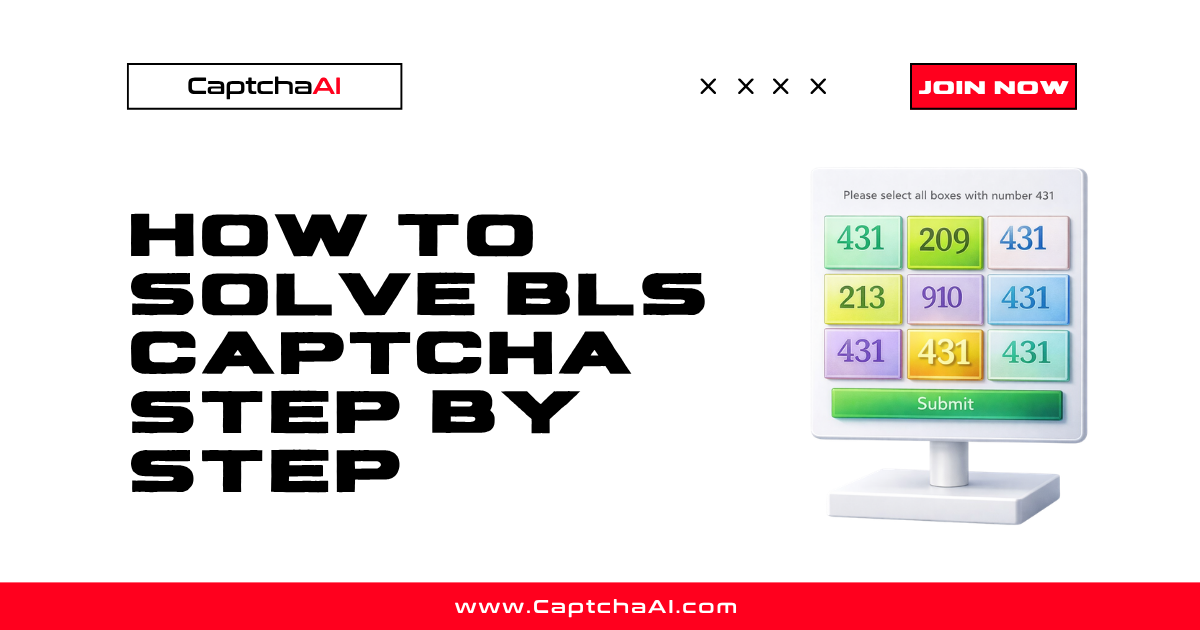
BLS CAPTCHA is a custom image-based challenge used on BLS International visa appointment systems. It displays multiple images and asks the user to select specific ones based on text instructions — similar to reCAPTCHA grid but with distinct images and custom instructions.
This guide covers extracting images, submitting them to CaptchaAI, and using the solution to complete BLS forms.
Requirements
| Item | Value |
|---|---|
| CaptchaAI API key | From captchaai.com |
| BLS CAPTCHA images | Base64-encoded from the page |
| Instructions text | The text telling which images to select |
| Language | Python 3.7+ or Node.js 14+ |
Step 1: Extract images and instructions from the page
BLS CAPTCHA typically shows 3–9 images with a text instruction like "Select all images with a car."
Using Selenium
from selenium import webdriver
from selenium.webdriver.common.by import By
import base64
import requests as req

driver = webdriver.Chrome()
driver.get("https://blsitalypakistan.com/appointment")

# Get instruction text
instruction = driver.find_element(By.CSS_SELECTOR, ".captcha-instruction").text
print(f"Instruction: {instruction}")

# Get all captcha images as base64
images = {}
captcha_imgs = driver.find_elements(By.CSS_SELECTOR, ".captcha-image img")
for i, img in enumerate(captcha_imgs, 1):
    src = img.get_attribute("src")
    if src.startswith("data:image"):
        # Already base64
        images[f"image_base64_{i}"] = src.split(",")[1]
    else:
        # Download and encode
        img_data = req.get(src).content
        images[f"image_base64_{i}"] = base64.b64encode(img_data).decode()
Using Puppeteer
const puppeteer = require('puppeteer');

const browser = await puppeteer.launch({ headless: 'new' });
const page = await browser.newPage();
await page.goto('https://blsitalypakistan.com/appointment');

// Get instruction
const instruction = await page.$eval('.captcha-instruction', el => el.textContent);

// Get images as base64
const images = await page.$$eval('.captcha-image img', imgs =>
  imgs.map((img, i) => ({
    key: `image_base64_${i + 1}`,
    value: img.src.startsWith('data:') ? img.src.split(',')[1] : null
  }))
);
Step 2: Submit to CaptchaAI
Send the instruction text and all images to the BLS solver.
Python
import requests
import time

API_KEY = "YOUR_API_KEY"

payload = {
    "key": API_KEY,
    "method": "bls",
    "instructions": instruction,
    "json": 1
}

# Add each image (up to 9)
for key, value in images.items():
    payload[key] = value

response = requests.post("https://ocr.captchaai.com/in.php", data=payload)
data = response.json()

if data.get("status") != 1:
    raise Exception(f"Submit error: {data.get('request')}")

task_id = data["request"]
print(f"Task submitted: {task_id}")
Node.js
const axios = require('axios');
const FormData = require('form-data');

async function submitBLS(instruction, images) {
  const params = {
    key: 'YOUR_API_KEY',
    method: 'bls',
    instructions: instruction,
    json: 1,
    ...Object.fromEntries(images.map(img => [img.key, img.value]))
  };

  const { data } = await axios.post('https://ocr.captchaai.com/in.php', null, { params });
  if (data.status !== 1) throw new Error(data.request);
  return data.request;
}
Step 3: Poll for the solution
The solution returns the indices of the correct images.
Python
def get_bls_solution(task_id):
    for _ in range(30):
        time.sleep(5)
        result = requests.get("https://ocr.captchaai.com/res.php", params={
            "key": API_KEY,
            "action": "get",
            "id": task_id,
            "json": 1
        }).json()

        if result.get("status") == 1:
            return result["request"]  # e.g., "1,3,5" (image indices)
        if result.get("request") != "CAPCHA_NOT_READY":
            raise Exception(f"Error: {result.get('request')}")

    raise Exception("Timeout")

solution = get_bls_solution(task_id)
print(f"Select images: {solution}")  # e.g., "1,3,5"
Step 4: Click the correct images
Use the returned indices to click the corresponding images on the page:
# Parse the solution indices
selected = [int(i) for i in solution.split(",")]

# Click each correct image
captcha_imgs = driver.find_elements(By.CSS_SELECTOR, ".captcha-image img")
for idx in selected:
    captcha_imgs[idx - 1].click()  # Convert 1-based to 0-based
    time.sleep(0.3)  # Small delay between clicks

# Submit the form
driver.find_element(By.CSS_SELECTOR, ".captcha-submit").click()
Complete Python example
import requests
import time
import base64
from selenium import webdriver
from selenium.webdriver.common.by import By

API_KEY = "YOUR_API_KEY"
driver = webdriver.Chrome()
driver.get("https://blsitalypakistan.com/appointment")

# 1. Extract instruction and images
instruction = driver.find_element(By.CSS_SELECTOR, ".captcha-instruction").text
captcha_imgs = driver.find_elements(By.CSS_SELECTOR, ".captcha-image img")

payload = {"key": API_KEY, "method": "bls", "instructions": instruction, "json": 1}
for i, img in enumerate(captcha_imgs, 1):
    src = img.get_attribute("src")
    if src.startswith("data:image"):
        payload[f"image_base64_{i}"] = src.split(",")[1]

# 2. Submit to CaptchaAI
resp = requests.post("https://ocr.captchaai.com/in.php", data=payload).json()
task_id = resp["request"]

# 3. Poll for solution
for _ in range(30):
    time.sleep(5)
    result = requests.get("https://ocr.captchaai.com/res.php", params={
        "key": API_KEY, "action": "get", "id": task_id, "json": 1
    }).json()
    if result.get("status") == 1:
        selected = [int(i) for i in result["request"].split(",")]
        break

# 4. Click correct images and submit
for idx in selected:
    captcha_imgs[idx - 1].click()
    time.sleep(0.3)
driver.find_element(By.CSS_SELECTOR, ".captcha-submit").click()

print("CAPTCHA solved!")
driver.quit()
Troubleshooting
| Error | Cause | Fix |
|---|---|---|
ERROR_BAD_PARAMETERS |
Missing instructions or images | Include both the text instruction and at least one image |
ERROR_CAPTCHA_UNSOLVABLE |
Images too blurry or unrecognizable | Capture higher quality images; ensure base64 encoding is correct |
| Wrong images selected | Incorrect image order | Ensure images are numbered in the correct display order |
| Solution rejected | Images changed after extraction | Extract images and submit immediately |
FAQ
How many images does BLS CAPTCHA show?
Typically 3–9 images. The number varies by page and session.
What format should images be in?
Base64-encoded PNG or JPEG. Remove the data:image/...;base64, prefix before sending.
How long does BLS CAPTCHA solving take?
15–30 seconds typically. Image recognition challenges take longer than text-based CAPTCHAs.
Can I solve BLS CAPTCHA without Selenium?
Yes, if you can extract the images and instructions via HTTP requests. The CaptchaAI API only needs the base64 images and instruction text.
Related guides
- How BLS CAPTCHA Works
- BLS CAPTCHA Errors and Troubleshooting
- BLS CAPTCHA vs reCAPTCHA Grid Comparison
Full Working Code
Complete runnable examples for this article in Python, Node.js, PHP, Go, Java, C#, Ruby, Rust, Kotlin & Bash.
View on GitHub →
Discussions (0)
Join the conversation
Sign in to share your opinion.
Sign InNo comments yet.