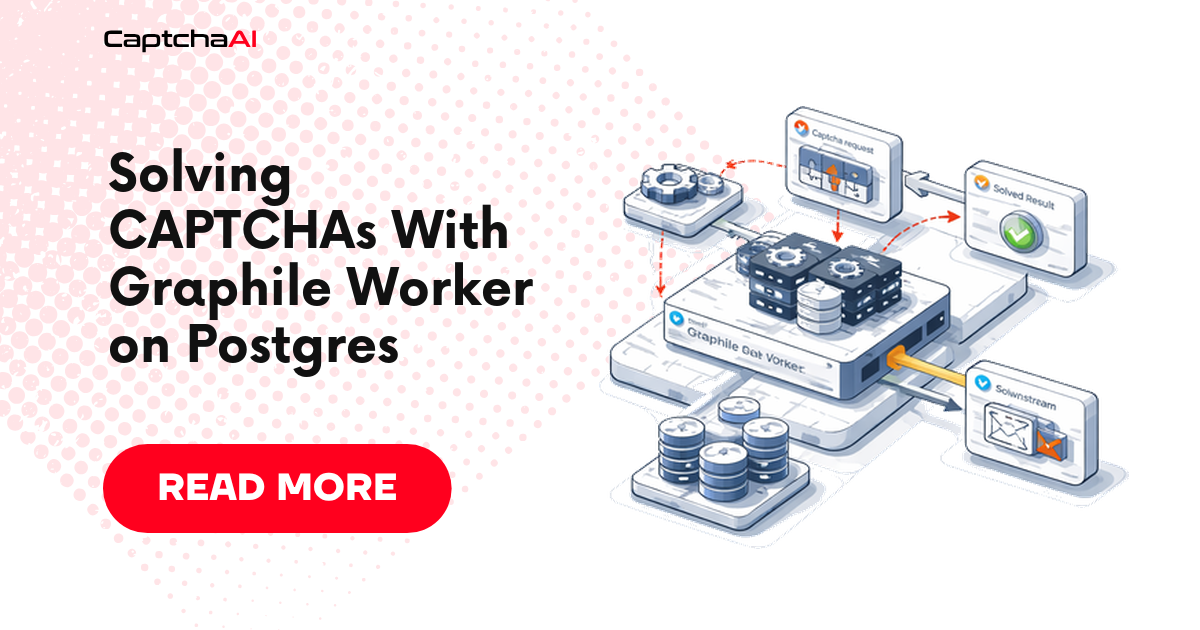
Graphile Worker can run each CaptchaAI solve as a pair of short jobs in the same Postgres database as your data: captcha_submit sends the task to in.php, and captcha_poll makes one res.php call per run and reschedules itself 5 seconds later until the token arrives. The constraint that shapes the design is that CAPCHA_NOT_READY is a normal answer, not a failure: reCAPTCHA v2 typically solves in under 60 seconds, so a single solve can return it several times. It must never be thrown as an error, because Graphile Worker's retry backoff runs on a clock built for failures, not for polling. The code targets forms you own or are authorized to automate, such as a signup page on your staging site.
Why Postgres is a good home for solve jobs
In-process and Redis-backed queues can run the same submit-and-poll loop (see a Node.js solving queue). What Graphile Worker adds is that jobs are rows in your database, which buys two things:
- Transactional enqueue. The row that needs a token and the job that fetches it commit or roll back together. There is no "row saved, job lost" window and no job for a row that never committed.
- A solve ledger you can query. Each solve is a
captcha_solvesrow with its status, CaptchaAI task ID, error code and timestamps, so latency percentiles and failure counts are oneSELECTaway.
The pipeline has four steps:
- Your application inserts a
captcha_solvesrow and callsgraphile_worker.add_job('captcha_submit', ...)in the same transaction. captcha_submitclaims one of your plan's threads, POSTs the task toin.php, stores the returned task ID and schedules the firstcaptcha_poll15 seconds out.captcha_pollcallsres.phpexactly once. OnCAPCHA_NOT_READYit re-adds itself 5 seconds later under the same job key; when the token arrives it saves it and enqueues the consumer job in the same statement.- The consumer (
submit_formbelow) uses the token while it is still valid.
Install Graphile Worker
Graphile Worker 0.18.0, released on 8 September 2026, requires Node.js 22.18 or newer and PostgreSQL 12 or newer, and is published as pure ESM. Node 22.18 strips TypeScript types natively, so the .ts files in this guide run with node worker.ts and no build step, as long as they stick to erasable syntax (no enum, no namespace); Graphile Worker 0.18 uses the same mechanism to load .ts files from a tasks/ directory. The worker creates or migrates its graphile_worker schema when it starts; --schema-only does that and exits, which suits a deploy step.
mkdir captcha-worker && cd captcha-worker
npm init -y
npm pkg set type=module                 # the .ts files use import/export
npm install [email protected]

export DATABASE_URL="postgres:///captcha_app"
export CAPTCHAAI_API_KEY="YOUR_API_KEY"  # replace with the 32-character dashboard key
export CAPTCHAAI_THREADS=5               # BASIC plan; 15 for STANDARD

psql "$DATABASE_URL" -f schema.sql
npx graphile-worker -c "$DATABASE_URL" --schema-only   # optional: install graphile_worker now
node worker.ts
The solve ledger
schema.sql holds one row per solve plus a small table for thread readings:
create table captcha_solves (
  id                bigint generated always as identity primary key,
  method            text not null check (method in ('userrecaptcha', 'turnstile')),
  sitekey           text not null check (length(sitekey) >= 20),
  pageurl           text not null check (pageurl ~ '^https?://'),
  next_task         text not null,                -- job that consumes the token
  status            text not null default 'queued' check (status in
                    ('queued', 'submitting', 'submitted', 'solved', 'failed', 'timeout')),
  captchaai_task_id text,
  token             text,
  error_code        text,
  created_at        timestamptz not null default now(),
  submitted_at      timestamptz,
  finished_at       timestamptz
);

-- The slot count in claimSlot() reads only in-flight rows.
create index captcha_solves_in_flight on captcha_solves (status)
  where status in ('submitting', 'submitted');

create table captchaai_threads (
  checked_at      timestamptz not null default now(),
  threads         int not null,
  working_threads int not null
);
A row moves from queued to submitting to submitted, then ends as solved, failed or timeout. The CHECK constraints reject bad input before anything reaches CaptchaAI: a method other than the two this worker handles, a page URL that is not http(s), and a sitekey under 20 characters, which catches leftover placeholders such as SITE_KEY. For retention and indexing of a table like this over months, see storing CAPTCHA solve results in PostgreSQL.
Enqueue in the same transaction
begin;

with s as (
  insert into captcha_solves (method, sitekey, pageurl, next_task)
  values ('userrecaptcha', '6LcR3xgqAAAAAHq1vV0mWc8dQ2pYk7sT9fBnE4jZ',  -- data-sitekey of your page
          'https://staging.example.com/signup', 'submit_form')
  returning id
)
select graphile_worker.add_job('captcha_submit', json_build_object('solveId', id),
         job_key := 'submit:' || id, max_attempts := 5)
  from s;

-- ...plus the application rows that depend on this solve

commit;
add_job takes named parameters, so you pass only what you need. job_key := 'submit:' || id gives the job a stable name: if a second code path (a "retry solve" button, a re-run backfill) enqueues the same solve while the first job is still waiting, the default replace mode updates the waiting job instead of adding another. max_attempts := 5 replaces the default of 25, for reasons covered below.
If every insert should start a solve, a trigger can do the enqueue so the application only writes the row:
create function captcha_solves_enqueue() returns trigger as $$
begin
  perform graphile_worker.add_job('captcha_submit',
            json_build_object('solveId', new.id),
            job_key := 'submit:' || new.id, max_attempts := 5);
  return new;
end;
$$ language plpgsql volatile;

create trigger captcha_solves_enqueue after insert on captcha_solves
  for each row execute procedure captcha_solves_enqueue();
Pick one of the two. If you keep both, the shared job key still leaves a single pending job.
The CaptchaAI client
// captchaai.ts: the three CaptchaAI calls the worker needs
const BASE = "https://ocr.captchaai.com";
const API_KEY = (process.env.CAPTCHAAI_API_KEY ?? "").trim();
if (API_KEY.length !== 32) {
  throw new Error("Set CAPTCHAAI_API_KEY to the 32-character key from your CaptchaAI dashboard");
}

// Codes that fail the same way on every retry: record them, never resend.
export const FATAL = new Set([
  "ERROR_WRONG_USER_KEY", "ERROR_KEY_DOES_NOT_EXIST", "IP_BANNED",
  "ERROR_PAGEURL", "ERROR_GOOGLEKEY", "ERROR_WRONG_GOOGLEKEY", "ERROR_WRONG_SITEKEY",
  "ERROR_BAD_TOKEN_OR_PAGEURL", "ERROR_BAD_PARAMETERS", "ERROR_BAD_PROXY",
  "ERROR_CAPTCHA_UNSOLVABLE", "ERROR_WRONG_ID_FORMAT", "ERROR_WRONG_CAPTCHA_ID",
  "ERROR_EMPTY_ACTION", "ERROR_PROXY_CONNECTION_FAILED",
]);

export type Reply = { ok: true; value: string } | { ok: false; code: string };

async function call(path: string, params: Record<string, string>, post: boolean): Promise<Reply> {
  const form = new URLSearchParams({ key: API_KEY, json: "1", ...params });
  const res = post
    ? await fetch(BASE + path, { method: "POST", body: form, signal: AbortSignal.timeout(30_000) })
    : await fetch(`${BASE}${path}?${form}`, { signal: AbortSignal.timeout(30_000) });
  const text = (await res.text()).trim();
  // Some errors come back as bare text even with json=1.
  if (/^[A-Z_]+$/.test(text)) return { ok: false, code: text };
  if (text.startsWith("OK|")) return { ok: true, value: text.slice(3) };
  let data: { status?: number; request?: unknown };
  try {
    data = JSON.parse(text);
  } catch {
    // An HTML 500/502 page: throw so Graphile Worker retries the job.
    throw new Error(`CaptchaAI HTTP ${res.status}: unexpected body`);
  }
  return data.status === 1
    ? { ok: true, value: String(data.request) }
    : { ok: false, code: String(data.request) };
}

export function submit(method: string, sitekey: string, pageurl: string): Promise<Reply> {
  // reCAPTCHA takes the site key as googlekey; Turnstile takes it as sitekey.
  const keyField = method === "userrecaptcha" ? "googlekey" : "sitekey";
  return call("/in.php", { method, [keyField]: sitekey, pageurl }, true);
}

export function poll(taskId: string): Promise<Reply> {
  return call("/res.php", { action: "get", id: taskId }, false);
}

export async function threadsInfo(): Promise<{ threads: number; working: number }> {
  const qs = new URLSearchParams({ key: API_KEY, action: "threadsinfo" });
  const res = await fetch(`${BASE}/res.php?${qs}`, { signal: AbortSignal.timeout(30_000) });
  const data = JSON.parse(await res.text());
  if (data.threads === undefined) throw new Error(`threadsinfo: ${JSON.stringify(data)}`);
  return { threads: Number(data.threads), working: Number(data.working_threads) };
}
in.php takes form fields: key, method, pageurl, json=1 and the sitekey. For reCAPTCHA v2 the method is userrecaptcha and the sitekey goes in googlekey; for Cloudflare Turnstile the method is turnstile and the field is sitekey. An accepted task returns {"status":1,"request":"<task id>"}. res.php with action=get&id=<task id> answers {"status":0,"request":"CAPCHA_NOT_READY"} (spelled without a T) until the token is ready in request. Two details the client handles: some errors arrive as bare text even when json=1 is set, and in rare cases the server returns an HTML 500 or 502 page, which the client throws so the job retries. action=threadsinfo returns your plan's threads and the working_threads currently in use.
This client reads the answer from request only. reCAPTCHA Enterprise (v2 and v3) and Cloudflare Challenge answers arrive in result instead, together with a user_agent you must reuse, so those types need call() to read result and a ledger column for the user agent. The field-by-field walkthroughs are in the reCAPTCHA v2 guide and the Turnstile guide.
Claiming a thread
// ledger.ts: state changes on captcha_solves that the tasks share
import type { JobHelpers } from "graphile-worker";

const MAX_IN_FLIGHT = Number(process.env.CAPTCHAAI_THREADS ?? "5"); // BASIC plan: 5 threads
if (!Number.isInteger(MAX_IN_FLIGHT) || MAX_IN_FLIGHT < 1) {
  throw new Error("CAPTCHAAI_THREADS must be your plan's thread count, e.g. 5 or 15");
}
const SLOT_LOCK = 4242; // advisory lock id that serialises slot claims

// Close the row for good: fatal code, deadline, or retries used up.
export async function fail(helpers: JobHelpers, solveId: number, status: string, code: string) {
  await helpers.query(
    `update captcha_solves set status = $2, error_code = $3, finished_at = now()
      where id = $1 and status in ('queued', 'submitting', 'submitted')`,
    [solveId, status, code],
  );
  helpers.logger.error(`solve ${solveId}: ${status} (${code})`);
}

// Retryable: throw so Graphile backs off, but release the row on the last attempt.
export async function transient(helpers: JobHelpers, solveId: number, code: string): Promise<never> {
  if (helpers.job.attempts >= helpers.job.max_attempts) await fail(helpers, solveId, "failed", code);
  throw new Error(code);
}

// Take one of the plan's threads for this row; null means all are in flight.
export function claimSlot(helpers: JobHelpers, solveId: number) {
  return helpers.withPgClient(async (pg) => {
    await pg.query("begin");
    try {
      await pg.query("select pg_advisory_xact_lock($1)", [SLOT_LOCK]);
      const { rows } = await pg.query(
        `update captcha_solves set status = 'submitting', submitted_at = now()
          where id = $1 and (status = 'submitting' or (status = 'queued' and
                (select count(*) from captcha_solves
                  where status in ('submitting', 'submitted')) < $2))
        returning method, sitekey, pageurl`,
        [solveId, MAX_IN_FLIGHT],
      );
      await pg.query("commit");
      return rows[0] ?? null;
    } catch (err) {
      await pg.query("rollback");
      throw err;
    }
  });
}
CaptchaAI bills by concurrent threads rather than per solve: BASIC ($15/month, 5 threads) can have five tasks in flight and STANDARD ($30/month, 15 threads) fifteen. In this design the worker's concurrency setting does not enforce that limit. A submit or poll run finishes in milliseconds, so ten concurrent worker slots could push hundreds of tasks to in.php within seconds. claimSlot() enforces the cap instead. It takes a transaction-scoped advisory lock so that claims happen one at a time across every worker process, counts the rows in submitting or submitted, and moves the row to submitting only if a thread is free. If other services share the API key, set CAPTCHAAI_THREADS below the plan's count. Hitting your CaptchaAI thread limit shows how to confirm saturation with threadsinfo and when to tune or upgrade instead.
transient() covers retryable failures. It throws so Graphile Worker applies its backoff, but on the final attempt it closes the row first, so a dead job never keeps a thread reserved. During a run, helpers.job.attempts counts the attempt in progress, so it equals max_attempts on the last one.
A row that finds every thread busy costs one short captcha_submit run every 10 seconds on average (the 5 to 15 second re-check below). That is nothing for a few dozen waiting rows, but a 10,000-row backfill enqueued at once would mean about 1,000 job runs a second, each taking the advisory lock. Enqueue large backfills in batches of a few times your thread count instead.
The submit and poll tasks
// tasks.ts: the Graphile Worker task executors
import type { Task } from "graphile-worker";
import { FATAL, poll, submit, threadsInfo } from "./captchaai.ts";
import { claimSlot, fail, transient } from "./ledger.ts";

const DEADLINE_S = 120; // stop polling this long after in.php accepted the task
type Ids = { solveId: number; taskId: string };

export const captcha_submit: Task = async (payload, helpers) => {
  const { solveId } = payload as Ids;
  const row = await claimSlot(helpers, solveId);
  if (!row) {
    const { rows } = await helpers.query<{ status: string }>(
      "select status from captcha_solves where id = $1", [solveId]);
    if (rows[0]?.status === "queued") {
      // Every thread is busy: look again in 5-15 s instead of throwing.
      await helpers.addJob("captcha_submit", { solveId }, {
        runAt: new Date(Date.now() + 5_000 + Math.random() * 10_000),
        jobKey: `submit:${solveId}`, maxAttempts: 5 });
    }
    return; // otherwise it is already submitted, solved or failed
  }
  let reply;
  try {
    reply = await submit(row.method, row.sitekey, row.pageurl);
  } catch (err) {
    return transient(helpers, solveId, `network: ${(err as Error).message}`);
  }
  if (!reply.ok) {
    if (FATAL.has(reply.code)) return fail(helpers, solveId, "failed", reply.code);
    return transient(helpers, solveId, reply.code); // ERROR_ZERO_BALANCE, ERROR_SERVER_ERROR, ...
  }
  // Store the task id and schedule the first poll in one statement, on Postgres' clock.
  await helpers.query(
    `with s as (
       update captcha_solves set status = 'submitted', captchaai_task_id = $2, submitted_at = now()
        where id = $1 and status = 'submitting' returning id)
     select graphile_worker.add_job('captcha_poll',
              json_build_object('solveId', id, 'taskId', $2::text),
              run_at := now() + interval '15 seconds', job_key := 'poll:' || id,
              max_attempts := 5)
       from s`,
    [solveId, reply.value],
  );
  helpers.logger.info(`solve ${solveId}: accepted as task ${reply.value}, first poll in 15s`);
};

export const captcha_poll: Task = async (payload, helpers) => {
  const { solveId, taskId } = payload as Ids;
  const { rows } = await helpers.query<{ status: string; age: number }>(
    `select status, extract(epoch from now() - submitted_at)::float8 as age
       from captcha_solves where id = $1`, [solveId]);
  if (rows[0]?.status !== "submitted") return; // finished or deleted meanwhile
  const age = Math.round(rows[0].age);
  if (age > DEADLINE_S) return fail(helpers, solveId, "timeout", "DEADLINE");

  let reply;
  try {
    reply = await poll(taskId); // exactly one res.php call per run
  } catch (err) {
    return transient(helpers, solveId, `network: ${(err as Error).message}`);
  }
  if (reply.ok) {
    // Save the token and enqueue its consumer atomically.
    await helpers.query(
      `with s as (
         update captcha_solves set status = 'solved', token = $2, finished_at = now()
          where id = $1 and status = 'submitted' returning id, next_task)
       select graphile_worker.add_job(next_task, json_build_object('solveId', id)) from s`,
      [solveId, reply.value],
    );
    helpers.logger.info(`solve ${solveId}: solved ${age}s after submit`);
    return;
  }
  if (reply.code === "CAPCHA_NOT_READY") {
    await helpers.addJob("captcha_poll", { solveId, taskId }, {
      runAt: new Date(Date.now() + 5_000), jobKey: `poll:${solveId}`, maxAttempts: 5 });
    helpers.logger.info(`solve ${solveId}: not ready at ${age}s, next poll in 5s`);
    return;
  }
  if (FATAL.has(reply.code)) return fail(helpers, solveId, "failed", reply.code);
  return transient(helpers, solveId, reply.code); // ERROR_INTERNAL_SERVER_ERROR
};

// Cron, once a minute: plan threads vs threads in use.
export const captcha_threads: Task = async (_payload, helpers) => {
  const t = await threadsInfo();
  await helpers.query(
    "insert into captchaai_threads (threads, working_threads) values ($1, $2)",
    [t.threads, t.working],
  );
  if (t.working >= t.threads) helpers.logger.warn(`all ${t.threads} CaptchaAI threads busy`);
};

// Consumer: the job that needs the token. Tokens are single-use and short-lived.
export const submit_form: Task = async (payload, helpers) => {
  const { solveId } = payload as Ids;
  const { rows } = await helpers.query<{ method: string; token: string; age: number }>(
    `select method, token, extract(epoch from now() - finished_at)::float8 as age
       from captcha_solves where id = $1 and status = 'solved'`, [solveId]);
  const row = rows[0];
  if (!row) return;
  const ttl = row.method === "turnstile" ? 300 : 120; // Cloudflare: 300 s, Google: 2 min
  if (row.age > ttl - 10) return helpers.logger.warn(`solve ${solveId}: token expired unused`);
  const field = row.method === "turnstile" ? "cf-turnstile-response" : "g-recaptcha-response";
  // Post the token as `field` from the same session that loaded the form.
  helpers.logger.info(`solve ${solveId}: using ${field} (${row.token.length} chars)`);
};
Why CAPCHA_NOT_READY returns instead of throwing
When a task throws, Graphile Worker schedules the next attempt exp(least(10, attempt)) seconds later, per its exponential backoff table:
| Attempt that failed | Delay before the next one | Elapsed since the first failure |
|---|---|---|
| 1 | 2.7 s | 2.7 s |
| 2 | 7.4 s | 10.1 s |
| 3 | 20.1 s | 30.2 s |
| 4 | 54.6 s | 1 min 25 s |
| 5 | 2 min 28 s | 3 min 53 s |
| 10 and later | about 6 h 7 min each |
If captcha_poll threw on not-ready, the checks would drift apart: the fifth would come 85 seconds after the first and the sixth almost four minutes after it. A token that became ready just after the fourth check would sit uncollected for 55 seconds, and one that missed the fifth would wait long enough for a two-minute reCAPTCHA token to expire. Every throw would also write last_error and count as a failed attempt in your job metrics, and with the default of 25 attempts the job would keep retrying for days. Returning after helpers.addJob(..., { runAt }) gives a steady check every 5 to 7 seconds (the extra comes from pollInterval, shown in the output below) and keeps the failure path for real failures. The addJob reference lists every option used here: runAt, jobKey, maxAttempts, priority and queueName.
Why not a loop that sleeps inside one job? It holds a concurrency slot for the whole solve, and on a deploy the worker's graceful shutdown fires the job's abortSignal after gracefulShutdownAbortTimeout (5 seconds by default), so a job sleeping through a long solve is either cut off or holds up the shutdown. Short jobs survive restarts: the next run finds its row and carries on.
Job keys on a running job
captcha_poll re-adds poll:42 while the job named poll:42 is itself running. In the default replace mode, Graphile Worker cannot overwrite a locked job, so it clears the running job's key, sets its attempts to max_attempts so it will not run again, and inserts a fresh job, as the job key documentation describes. The current run then returns and is deleted. One consequence: once a poll run has re-added itself, it must not throw, because the old job has no retries left and the new one already exists. Do not switch to unsafe_dedupe here. It skips the insert whenever any job with that key exists, including the running one, so the solve would quietly stop polling.
Which outcomes throw
- Retry with backoff. Network errors, HTML error pages,
ERROR_SERVER_ERRORandERROR_INTERNAL_SERVER_ERRORthrow. Withmax_attemptsat 5, the last retry starts about 85 seconds after the first failure, and every poll run still checks the 120-second deadline. CaptchaAI suggests waiting about 10 seconds before retrying a server error; the first two backoff delays (2.7 s and 7.4 s) are shorter, so a persistent server error costs two early retries before the schedule passes that mark. - Record and stop. Key errors, a bad sitekey or page URL,
ERROR_CAPTCHA_UNSOLVABLEand task-ID errors mark the rowfailedand return. Resending them unchanged cannot succeed; CaptchaAI's API documentation warns that poor error handling can get an account suspended, and repeated wrong-key requests get the calling IP banned for five minutes (IP_BANNED). The error codes reference explains each one. ERROR_ZERO_BALANCE. On CaptchaAI this means no free thread or no active plan. It is retried here; if it keeps closing rows, compare thecaptchaai_threadsreadings with your cap.
On success the UPDATE and add_job(next_task, ...) run as a single statement, so a solved row can never be left without its consumer. Keeping the token in the ledger rather than in a job payload lets you null the column once it has been used. Google documents a two-minute lifetime for reCAPTCHA tokens and Cloudflare 300 seconds for Turnstile, and both are single-use, which is why submit_form refuses a token within 10 seconds of expiry. The reCAPTCHA token lifecycle covers where that two-minute clock starts and the races that burn tokens.
Running the worker
// worker.ts: start with `node worker.ts` (Node 22.18+ strips the types itself)
import { run } from "graphile-worker";
import { captcha_poll, captcha_submit, captcha_threads, submit_form } from "./tasks.ts";

const connectionString = process.env.DATABASE_URL;
if (!connectionString) throw new Error("Set DATABASE_URL, e.g. postgres:///captcha_app");

const runner = await run({
  connectionString,
  concurrency: 10, // parallel job runs; the thread cap lives in claimSlot()
  taskList: { captcha_submit, captcha_poll, captcha_threads, submit_form },
  crontab: "* * * * * captcha_threads ?max=1",
});
await runner.promise;
The crontab line uses the usual five fields, evaluated in UTC, so captcha_threads runs every minute; ?max=1 stops a failed reading from being retried, since the next minute brings a fresh one. concurrency: 10 bounds how many jobs this process runs at once, not how many CaptchaAI tasks are in flight. To let interactive solves overtake a bulk backfill, enqueue the bulk rows with priority := 10: jobs with a numerically smaller priority run first, and the default is 0. Do not reach for queue_name to do this, because jobs in a named queue run strictly one at a time.
Expected output
This run used Graphile Worker 0.18.0 on Node 22.18 with CAPTCHAAI_THREADS=3 and BASE pointed at a local stub of in.php and res.php that answers CAPCHA_NOT_READY for the first 24 seconds, so the solve times are artificial; real ones vary by CAPTCHA type and load. Six solves were enqueued at once. Solves 4 to 6 found all three threads in use; their re-checks log only a Completed task line, trimmed here along with the stack trace. When solve 3 came back ERROR_CAPTCHA_UNSOLVABLE, its thread went to solve 5, which hit one ERROR_SERVER_ERROR and went through on its second attempt.
[job(worker-2fdf4d30838d383e66: captcha_submit{1})] INFO: solve 1: accepted as task 73512234100, first poll in 15s
[job(worker-60f3cfd4a1655647c0: captcha_submit{2})] INFO: solve 2: accepted as task 73512234101, first poll in 15s
[job(worker-bb121a6365d88ca0dd: captcha_submit{3})] INFO: solve 3: accepted as task 73512234102, first poll in 15s
[job(worker-bb121a6365d88ca0dd: captcha_poll{9})] INFO: solve 2: not ready at 16s, next poll in 5s
[job(worker-571b8bf1fe2d896d18: captcha_poll{8})] ERROR: solve 3: failed (ERROR_CAPTCHA_UNSOLVABLE)
[job(worker-60f3cfd4a1655647c0: captcha_poll{7})] INFO: solve 1: not ready at 16s, next poll in 5s
[worker(worker-a2b0aebb34b0a7885a)] ERROR: Failed task 13 (captcha_submit, 10.52ms, attempt 1 of 5) with error 'ERROR_SERVER_ERROR':
[job(worker-f5ea6525a44ea71467: captcha_poll{18})] INFO: solve 1: not ready at 22s, next poll in 5s
[job(worker-098f034030275bd68d: captcha_submit{13})] INFO: solve 5: accepted as task 73512234103, first poll in 15s
[job(worker-571b8bf1fe2d896d18: captcha_poll{21})] INFO: solve 1: solved 28s after submit
[job(worker-571b8bf1fe2d896d18: submit_form{25})] INFO: solve 1: using g-recaptcha-response (408 chars)
[job(worker-2fdf4d30838d383e66: submit_form{26})] INFO: solve 2: using cf-turnstile-response (408 chars)
[job(worker-60f3cfd4a1655647c0: captcha_submit{20})] ERROR: solve 4: failed (ERROR_WRONG_SITEKEY)
The checks land at 16, 22 and 28 seconds, not 15, 20 and 25. Adding a job sends a NOTIFY, but a job scheduled for the future is not yet due at that moment, so an idle worker picks it up on its next periodic check, every pollInterval (2,000 ms by default). Each check can therefore start up to 2 seconds after its runAt. Lower pollInterval if a tighter cadence is worth the extra queries.
Measuring solves with SQL
The ledger answers the operational questions directly:
-- Seconds from in.php acceptance to token, last 24 hours
select method, count(*) as solved,
       round(percentile_cont(0.5) within group (
             order by extract(epoch from finished_at - submitted_at))::numeric, 1) as p50_s,
       round(percentile_cont(0.95) within group (
             order by extract(epoch from finished_at - submitted_at))::numeric, 1) as p95_s
  from captcha_solves
 where status = 'solved' and finished_at > now() - interval '24 hours'
 group by method;

-- Failures per day and reason
select created_at::date as day, status, error_code, count(*)
  from captcha_solves
 where status in ('failed', 'timeout')
 group by 1, 2, 3
 order by 1 desc, 4 desc;

-- Peak thread use per hour, from the cron readings
select date_trunc('hour', checked_at) as hour,
       max(working_threads) as peak_working, max(threads) as plan_threads
  from captchaai_threads
 group by 1
 order by 1 desc
 limit 24;
A rising p95 with peak_working pinned at plan_threads means solves are queuing for threads, not getting slower. A cluster of one error_code usually points at your inputs, such as a sitekey that changed after a front-end deploy.
Using pgmq instead
If you already run the pgmq extension and would rather not add a Node worker, the same loop maps onto a visibility timeout. After in.php accepts the task, send a message with a 15-second delay. The consumer reads it with a visibility timeout long enough to cover one res.php call, and on CAPCHA_NOT_READY calls set_vt to hide it for 5 more seconds. read_ct counts the polls, enqueued_at gives you the deadline, and if a consumer crashes the message reappears when its timeout lapses. The calls, from the pgmq function reference:
select pgmq.create('captcha_polls');

-- in.php accepted task 73512234100 for ledger row 42: first check in 15 s
select * from pgmq.send('captcha_polls', '{"solveId": 42, "taskId": "73512234100"}', 15);

-- consumer: take one due message and hide it for 30 s while res.php is called once
select msg_id, read_ct, enqueued_at, message from pgmq.read('captcha_polls', 30, 1);

-- CAPCHA_NOT_READY: make message 17 visible again in 5 s
select msg_id from pgmq.set_vt('captcha_polls', 17, 5);

-- token saved or fatal code recorded: move it to the archive table
select pgmq.archive('captcha_polls', 17);
What you give up: job keys (deduplicate on the ledger row instead), built-in retries and cron, and a ready-made worker loop. What you gain: archived messages stay queryable for auditing.
Troubleshooting
Jobs sit in graphile_worker.jobs and never start. Confirm a worker is running against the same database and schema, then check task names. A worker only fetches jobs whose task_identifier is in its task list, so a typo in next_task leaves the consumer job waiting forever. select task_identifier, count(*) from graphile_worker.jobs group by 1 shows what is queued.
New jobs start up to 2 seconds late behind PgBouncer. Graphile Worker hears about new jobs through LISTEN/NOTIFY, and PgBouncer's transaction pooling mode does not support LISTEN. The worker then finds even jobs that are due immediately, such as the first captcha_submit and the consumer, only on its periodic check, every pollInterval (2,000 ms by default). Connect the worker to Postgres directly or through a session-mode pool, and set noPreparedStatements: true if your pool cannot handle prepared statements.
Polls fire back to back, or far later than 5 seconds. The runAt passed to helpers.addJob comes from Node's clock, while the worker compares run_at with Postgres's now() by default. If the worker host lags the database by 10 seconds, "5 seconds from now" is already in the past and captcha_poll calls res.php as fast as the worker can loop until the deadline. Run NTP on both hosts, or pass useNodeTime: true to run() so the worker compares against the same clock that produced runAt. The first poll avoids the problem because captcha_submit computes its run_at in SQL.
Finding permanently failed jobs. Query the public graphile_worker.jobs view, never the _private_jobs table, whose layout can change between releases. Rows with locked_at set are still running (a last attempt, or a poll run that has just re-added itself under its job key), not failures:
select id, task_identifier, attempts, max_attempts, last_error, updated_at
  from graphile_worker.jobs
 where attempts >= max_attempts and locked_at is null
 order by updated_at desc;
A row stuck in submitting or submitted. If a worker process died between steps, list rows that no longer have a job, then reset them to queued and enqueue captcha_submit again, or mark them failed:
select s.id, s.status, s.submitted_at
  from captcha_solves s
 where s.status in ('submitting', 'submitted')
   and s.submitted_at < now() - interval '5 minutes'
   and not exists (select 1 from graphile_worker.jobs j
                    where j.key in ('submit:' || s.id, 'poll:' || s.id));
FAQ
How many jobs does one solve create?
One captcha_submit (plus one per re-check while every thread is busy), one captcha_poll per check and one consumer. A solve that is ready 30 seconds after submission is checked at roughly 16, 22, 28 and 34 seconds, so it creates six short jobs, and each is deleted as soon as it succeeds.
Can services written in other languages enqueue solves?
Yes. graphile_worker.add_job is a plain SQL function, so a Python, Go or PHP service can insert the ledger row and enqueue captcha_submit in its own transaction. Only the task executors need to run in Node.
Does this work for reCAPTCHA v3 or Enterprise?
With small changes. All reCAPTCHA variants keep method=userrecaptcha, so the method check stays as it is; what changes is the extra fields. reCAPTCHA v3 adds version=v3 and the page's action to the in.php call, and CaptchaAI's proxy guide advises against sending a proxy with it. The Enterprise variants add enterprise=1 and return the token in result rather than request, with a user_agent your consumer must reuse. Add ledger columns for version, action, enterprise and the returned user agent, pass the first three through submit(), and have call() read result.
Point the worker at your plan
Set CAPTCHAAI_THREADS to your plan's thread count, create the two tables and start node worker.ts. From then on, every CAPTCHA your application needs is one row inserted in the transaction that needs it, and the ledger tells you how long each one took. If peak_working sits at the cap for hours, compare plans and thread counts on the CaptchaAI pricing page.