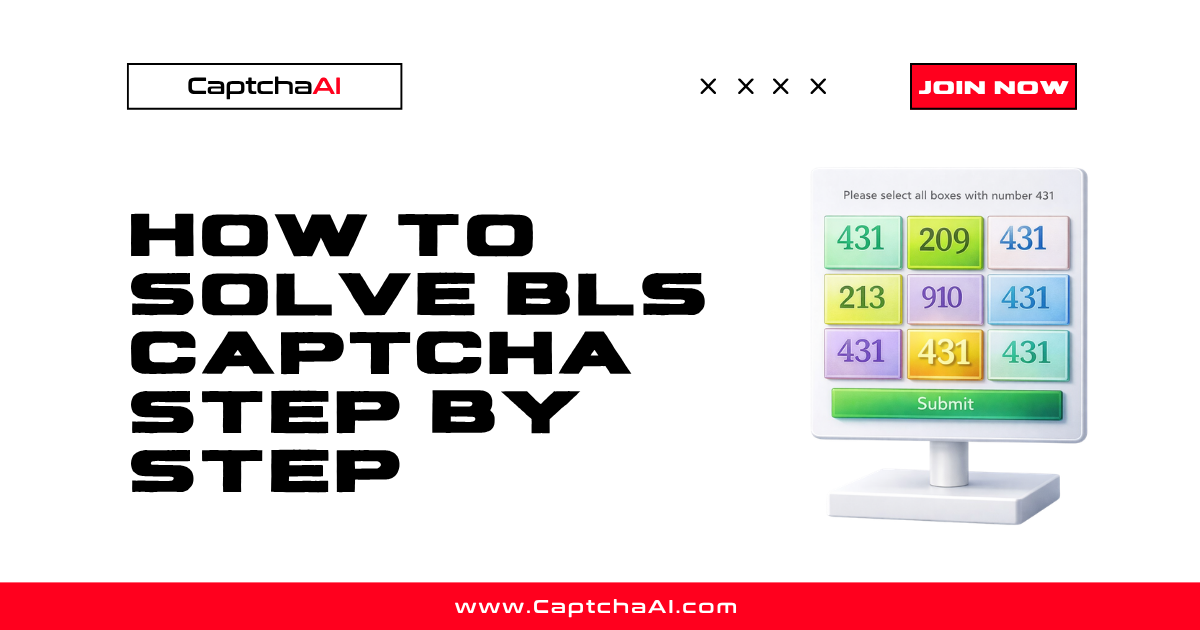
BLS CAPTCHA presents a 3×3 grid of images with a numeric instruction code specifying which cells to select. This tutorial shows you how to solve BLS CAPTCHAs from Node.js using the CaptchaAI API.
Prerequisites
| Item | Value |
|---|---|
| CaptchaAI API key | From captchaai.com |
| Node.js | 14+ |
| Library | axios (npm install axios) |
How BLS CAPTCHA works
A 3×3 grid numbered left-to-right, top-to-bottom:
1 | 2 | 3
---------
4 | 5 | 6
---------
7 | 8 | 9
A numeric instruction (e.g., "664") specifies what to select. CaptchaAI returns the indices of matching cells.
Step 1: Extract grid images
const axios = require('axios');
const puppeteer = require('puppeteer');

const browser = await puppeteer.launch();
const page = await browser.newPage();
await page.goto('https://example.com/bls-form');

// Get instruction code
const instruction = await page.$eval('.bls-instruction', (el) => el.textContent.trim());

// Get all 9 cell image URLs and convert to base64
const cellImages = await page.$$eval('.bls-grid img', (imgs) =>
  imgs.map((img) => img.src)
);

const images = [];
for (const src of cellImages) {
  if (src.startsWith('data:')) {
    images.push(src);
  } else {
    const { data } = await axios.get(src, { responseType: 'arraybuffer' });
    const b64 = Buffer.from(data).toString('base64');
    images.push(`data:image/png;base64,${b64}`);
  }
}
Step 2: Submit to CaptchaAI
const API_KEY = 'YOUR_API_KEY';
const sleep = (ms) => new Promise((r) => setTimeout(r, ms));

const params = new URLSearchParams({
  key: API_KEY,
  method: 'bls',
  instructions: instruction,
  json: '1',
});

// Add all 9 images
images.forEach((img, i) => {
  params.append(`image_base64_${i + 1}`, img);
});

const { data: submitData } = await axios.post(
  'https://ocr.captchaai.com/in.php',
  params.toString()
);

if (submitData.status !== 1) throw new Error(submitData.request);
const taskId = submitData.request;
console.log(`Task submitted: ${taskId}`);
Step 3: Poll for the solution
await sleep(5000);

let selectedCells;
for (let i = 0; i < 30; i++) {
  const { data: pollData } = await axios.get('https://ocr.captchaai.com/res.php', {
    params: { key: API_KEY, action: 'get', id: taskId, json: 1 },
  });

  if (pollData.status === 1) {
    selectedCells = JSON.parse(pollData.request);
    console.log('Selected cells:', selectedCells);
    break;
  }
  if (pollData.request !== 'CAPCHA_NOT_READY') {
    throw new Error(pollData.request);
  }
  await sleep(5000);
}
Step 4: Click the correct cells
// Click each identified cell
const gridCells = await page.$$('.bls-grid img');
for (const cellNum of selectedCells) {
  await gridCells[cellNum - 1].click();
}

// Submit the form
await page.click('.bls-submit');
console.log(`Solved: clicked cells ${JSON.stringify(selectedCells)}`);
await browser.close();
Expected output:
Selected cells: [1, 4, 7, 8]
Solved: clicked cells [1,4,7,8]
Common errors
| Error | Cause | Fix |
|---|---|---|
ERROR_BAD_PARAMETERS |
Missing images or instruction | Send all 9 images and the instruction code |
CAPCHA_NOT_READY |
Still processing | Keep polling every 5 seconds |
ERROR_ZERO_BALANCE |
No funds | Top up your CaptchaAI account |
FAQ
Does BLS CAPTCHA support 4×4 grids?
BLS CAPTCHA uses 3×3 grids (9 cells). For 4×4 grids, use the Grid Image method instead.
How fast is BLS solving?
Typically 5–15 seconds.
Can I use Playwright instead of Puppeteer?
Yes. The API interaction is the same — just change the browser automation calls.
Related guides
Start solving BLS CAPTCHAs with CaptchaAI →
Full Working Code
Complete runnable examples for this article in Python, Node.js, PHP, Go, Java, C#, Ruby, Rust, Kotlin & Bash.
View on GitHub →
Discussions (0)
Join the conversation
Sign in to share your opinion.
Sign InNo comments yet.