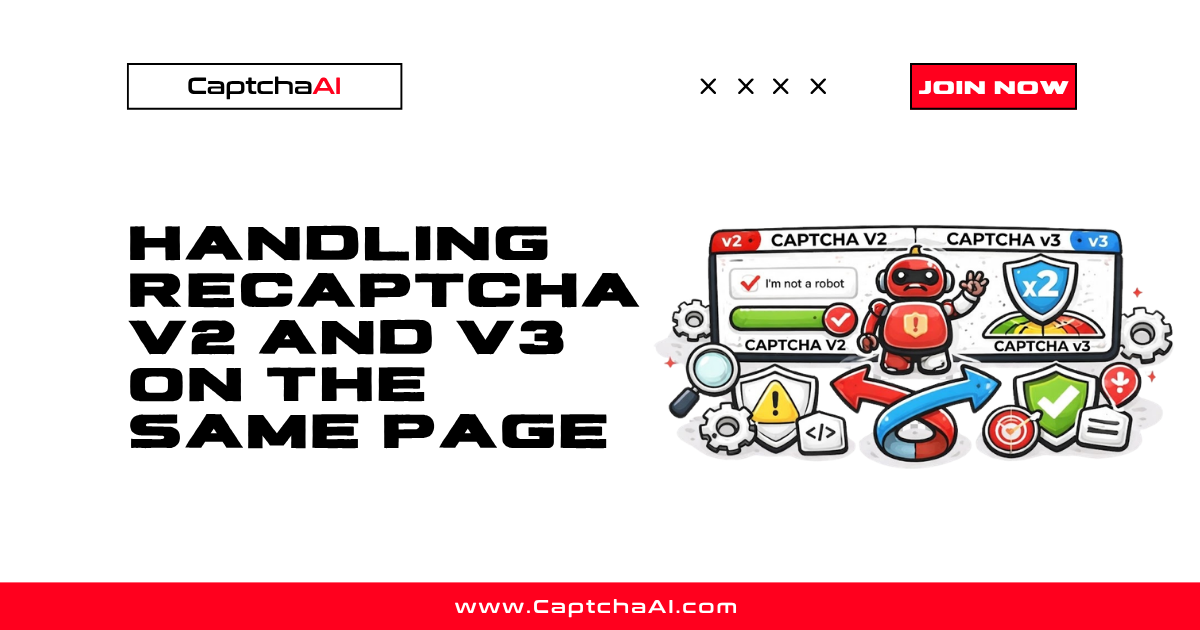
Some websites implement both reCAPTCHA v2 and v3 on the same page. The typical pattern is: v3 runs invisibly in the background, and if the score is too low, v2 appears as a visible fallback challenge. This dual implementation creates confusion for automation because you need to handle two different CAPTCHA types with different solving methods. This guide covers detection, solving strategies, and common edge cases.
Why sites use both v2 and v3 together
User visits page
    ↓
reCAPTCHA v3 runs invisibly in background
    ↓
Score returned to server (e.g., 0.4)
    ↓
Score below threshold (e.g., < 0.7)?
    ├─ YES → Show reCAPTCHA v2 checkbox/image challenge
    └─ NO  → Allow action without visible CAPTCHA
This pattern provides the best of both worlds:
- Most users (high v3 score) see no CAPTCHA → low friction
- Suspicious users (low v3 score) see v2 challenge → security fallback
- Website operator controls the threshold between invisible and visible
Dual implementation patterns
Pattern 1: v3 pre-assessment + v2 fallback
The most common pattern. v3 runs first, and v2 appears only if needed.
<!-- Both scripts loaded -->
<script src="https://www.google.com/recaptcha/api.js?render=V3_SITE_KEY"></script>
<script src="https://www.google.com/recaptcha/api.js?render=explicit" async defer></script>

<form id="loginForm">
    <!-- v2 widget (hidden initially) -->
    <div id="recaptcha-v2-container" style="display:none;">
        <div class="g-recaptcha" data-sitekey="V2_SITE_KEY"></div>
    </div>
    <button type="submit">Login</button>
</form>

<script>
// First attempt: v3 invisible
grecaptcha.ready(function() {
    grecaptcha.execute('V3_SITE_KEY', {action: 'login'}).then(function(v3Token) {
        fetch('/api/verify-v3', {
            method: 'POST',
            body: JSON.stringify({token: v3Token})
        })
        .then(r => r.json())
        .then(data => {
            if (data.score < 0.7) {
                // Score too low → show v2 fallback
                document.getElementById('recaptcha-v2-container').style.display = 'block';
                grecaptcha.render('recaptcha-v2-container', {sitekey: 'V2_SITE_KEY'});
            } else {
                // Score OK → submit form directly
                document.getElementById('loginForm').submit();
            }
        });
    });
});
</script>
Pattern 2: Different site keys for different actions
Some sites use v3 for passive monitoring and v2 for specific high-risk actions:
Homepage → v3 only (passive score)
Login page → v3 assessment, v2 fallback
Checkout → v2 always (high security)
Contact form → v3 only
Pattern 3: Single script, dual mode
Google supports loading a single reCAPTCHA script that handles both v2 and v3:
<script src="https://www.google.com/recaptcha/api.js?render=V3_SITE_KEY"></script>
<script>
    // v3 execute
    grecaptcha.execute('V3_SITE_KEY', {action: 'login'});

    // v2 render (uses a different site key)
    grecaptcha.render('v2-container', {sitekey: 'V2_SITE_KEY'});
</script>
Detecting dual implementation
Python detection
import requests
import re

def detect_dual_recaptcha(url):
    """Detect if a page uses both reCAPTCHA v2 and v3."""
    headers = {
        "User-Agent": "Mozilla/5.0 (Windows NT 10.0; Win64; x64) "
                      "AppleWebKit/537.36 (KHTML, like Gecko) "
                      "Chrome/120.0.0.0 Safari/537.36",
    }
    html = requests.get(url, headers=headers, timeout=15).text

    result = {
        "has_v3": False,
        "has_v2": False,
        "v3_site_key": None,
        "v2_site_key": None,
        "dual": False,
        "pattern": None,
    }

    # Detect v3 (render parameter or enterprise.execute)
    v3_match = re.search(r"api\.js\?render=([A-Za-z0-9_-]+)", html)
    if v3_match and v3_match.group(1) != "explicit":
        result["has_v3"] = True
        result["v3_site_key"] = v3_match.group(1)

    # Detect v3 in execute calls
    v3_execute = re.search(
        r"grecaptcha\.(?:enterprise\.)?execute\s*\(\s*['\"]([^'\"]+)['\"]",
        html,
    )
    if v3_execute:
        result["has_v3"] = True
        if not result["v3_site_key"]:
            result["v3_site_key"] = v3_execute.group(1)

    # Detect v2 (g-recaptcha class or explicit render)
    v2_match = re.search(r'data-sitekey="([^"]+)"', html)
    if v2_match:
        key = v2_match.group(1)
        if key != result.get("v3_site_key"):
            result["has_v2"] = True
            result["v2_site_key"] = key

    # Check for explicit v2 render
    v2_render = re.search(
        r"grecaptcha\.render\s*\([^,]+,\s*\{[^}]*sitekey:\s*['\"]([^'\"]+)",
        html,
    )
    if v2_render:
        result["has_v2"] = True
        if not result["v2_site_key"]:
            result["v2_site_key"] = v2_render.group(1)

    result["dual"] = result["has_v3"] and result["has_v2"]

    if result["dual"]:
        # Determine pattern
        if "display:none" in html or "display: none" in html:
            result["pattern"] = "v3_pre_assessment_v2_fallback"
        else:
            result["pattern"] = "v2_v3_simultaneous"

    return result

detection = detect_dual_recaptcha("https://example.com/login")
print(detection)
Node.js detection
const axios = require("axios");

async function detectDualRecaptcha(url) {
    const { data: html } = await axios.get(url, { timeout: 15000 });

    const result = {
        hasV3: false,
        hasV2: false,
        v3SiteKey: null,
        v2SiteKey: null,
        dual: false,
    };

    // v3 detection
    const v3Match = html.match(/api\.js\?render=([A-Za-z0-9_-]+)/);
    if (v3Match && v3Match[1] !== "explicit") {
        result.hasV3 = true;
        result.v3SiteKey = v3Match[1];
    }

    // v2 detection
    const v2Match = html.match(/data-sitekey="([^"]+)"/);
    if (v2Match && v2Match[1] !== result.v3SiteKey) {
        result.hasV2 = true;
        result.v2SiteKey = v2Match[1];
    }

    result.dual = result.hasV3 && result.hasV2;
    return result;
}

detectDualRecaptcha("https://example.com/login").then(console.log);
Solving strategies for dual reCAPTCHA
Strategy 1: Solve v3 first, then v2 if needed
The optimal strategy mirrors the site's own flow:
import requests
import time

API_KEY = "YOUR_API_KEY"

def solve_v3(site_key, page_url, action="login"):
    """Solve reCAPTCHA v3 and return token."""
    submit = requests.post("https://ocr.captchaai.com/in.php", data={
        "key": API_KEY,
        "method": "userrecaptcha",
        "googlekey": site_key,
        "pageurl": page_url,
        "version": "v3",
        "action": action,
        "min_score": "0.9",
        "json": 1,
    }).json()

    task_id = submit["request"]

    for _ in range(60):
        time.sleep(5)
        result = requests.get("https://ocr.captchaai.com/res.php", params={
            "key": API_KEY, "action": "get", "id": task_id, "json": 1,
        }).json()
        if result.get("status") == 1:
            return result["request"]

    raise TimeoutError("v3 solve timeout")


def solve_v2(site_key, page_url):
    """Solve reCAPTCHA v2 and return token."""
    submit = requests.post("https://ocr.captchaai.com/in.php", data={
        "key": API_KEY,
        "method": "userrecaptcha",
        "googlekey": site_key,
        "pageurl": page_url,
        "json": 1,
    }).json()

    task_id = submit["request"]

    for _ in range(60):
        time.sleep(5)
        result = requests.get("https://ocr.captchaai.com/res.php", params={
            "key": API_KEY, "action": "get", "id": task_id, "json": 1,
        }).json()
        if result.get("status") == 1:
            return result["request"]

    raise TimeoutError("v2 solve timeout")


def solve_dual_recaptcha(v3_key, v2_key, page_url, action="login"):
    """Handle dual reCAPTCHA: try v3, fall back to v2."""
    # Step 1: Try v3
    v3_token = solve_v3(v3_key, page_url, action)

    # Step 2: Submit v3 token to target
    response = requests.post(f"{page_url}/verify", data={
        "g-recaptcha-response": v3_token,
    })

    # Step 3: Check if v2 fallback is needed
    if "recaptcha" in response.text.lower() and v2_key:
        print("v3 score too low — v2 fallback triggered")
        v2_token = solve_v2(v2_key, page_url)
        return {"version": "v2", "token": v2_token}

    return {"version": "v3", "token": v3_token}


result = solve_dual_recaptcha(
    v3_key="6LcExample_v3_key",
    v2_key="6LcExample_v2_key",
    page_url="https://example.com/login",
)
print(f"Solved with {result['version']}")
Strategy 2: Skip v3, solve v2 directly
If you know the site always shows v2 for automated traffic (v3 score will be low), skip v3 and solve v2 immediately:
# If you consistently fail v3 assessment, just solve v2 directly
token = solve_v2(v2_site_key, page_url)
submit_form(token)
This saves the time and cost of a v3 solve that might not pass the threshold.
Strategy 3: Browser-based handling
For complex implementations, use a browser to handle the fallback flow:
from selenium import webdriver
from selenium.webdriver.common.by import By
import time

driver = webdriver.Chrome()
driver.get("https://example.com/login")
time.sleep(3)

# Check if v2 widget is visible
v2_visible = driver.execute_script("""
    const container = document.querySelector('.g-recaptcha');
    if (!container) return false;
    const style = window.getComputedStyle(container.parentElement);
    return style.display !== 'none' && style.visibility !== 'hidden';
""")

if v2_visible:
    # v2 is showing — solve v2
    sitekey = driver.find_element(
        By.CSS_SELECTOR, "[data-sitekey]"
    ).get_attribute("data-sitekey")
    token = solve_v2(sitekey, driver.current_url)
    driver.execute_script(
        f'document.getElementById("g-recaptcha-response").value = "{token}";'
    )
else:
    # v3 only — solve v3
    # Extract v3 key from page source
    v3_key = driver.execute_script(
        "return document.querySelector('script[src*=\"render=\"]')"
        ".src.match(/render=([^&]+)/)[1];"
    )
    token = solve_v3(v3_key, driver.current_url)
    # Inject v3 token into the form
    driver.execute_script(f"""
        const input = document.createElement('input');
        input.type = 'hidden';
        input.name = 'g-recaptcha-response';
        input.value = '{token}';
        document.querySelector('form').appendChild(input);
    """)

driver.find_element(By.CSS_SELECTOR, "form").submit()
Edge cases
Two different site keys on the same page
Sites using dual reCAPTCHA will have TWO different site keys — one for v3 and one for v2. The v3 key appears in the script URL ?render=KEY and in grecaptcha.execute('KEY', ...). The v2 key appears in data-sitekey="KEY" on the widget div. Using the wrong key for the wrong version will produce invalid tokens.
reCAPTCHA Enterprise with v2 fallback
Some Enterprise implementations use v3 Enterprise for scoring and v2 for challenges:
# Detect and handle Enterprise + v2 combo
if "recaptcha/enterprise.js" in html:
    # Use enterprise parameter for v3
    v3_params = {"enterprise": 1, "version": "v3"}
else:
    v3_params = {"version": "v3"}
Multiple forms on one page
If a page has multiple forms (login + registration), each may have its own reCAPTCHA instance. Extract the site key from the specific form you are targeting:
# Target the login form specifically
login_form = soup.find("form", id="login-form")
widget = login_form.find(attrs={"data-sitekey": True})
sitekey = widget["data-sitekey"]
Frequently asked questions
Do I need to solve both v2 and v3 on the same page?
No. Typically, you solve v3 first (it runs automatically). If the v3 score passes the site's threshold, no v2 challenge appears and you are done. You only need to solve v2 if the v3 score triggers the fallback.
Can I use a single CaptchaAI API call for dual reCAPTCHA?
No. v2 and v3 are separate CAPTCHA types with different site keys and solving methods. Each requires its own API call to CaptchaAI. However, you only need to make one call if v3 passes without triggering v2.
How do I know if v2 fallback was triggered?
Check the server response after submitting the v3 token. If the response contains v2 widget HTML or triggers a v2 challenge (redirect or AJAX response with CAPTCHA HTML), the fallback was triggered. In a browser, check if the v2 container becomes visible after the v3 submission.
Which site key do I use for each version?
The v3 site key is in the script URL: api.js?render=V3_KEY. The v2 site key is in the widget HTML: data-sitekey="V2_KEY". They are always different keys.
Summary
Dual reCAPTCHA implementations use v3 for invisible pre-assessment and v2 as a visible fallback when the v3 score is too low. Detect both versions by checking for the render parameter (v3) and widget data-sitekey (v2). The optimal automation strategy is: solve v3 first with CaptchaAI, submit the token, and solve v2 only if the fallback triggers. Each version requires a separate API call with its own site key.

Discussions (0)
Join the conversation
Sign in to share your opinion.
Sign InNo comments yet.